Launch10 vs Unbounce: Full Campaign vs Page Builder

If you’re comparing Launch10 and Unbounce, you’re really asking a bigger question: do I have the right traffic problem, or the wrong traffic problem?
Here’s the cleanest framing we know: Unbounce optimizes whoever shows up. Launch10 brings the right people to the page. Unbounce has been around since 2009 and is genuinely one of the best landing page builders ever made. Their Smart Traffic feature — AI that routes each visitor to the variant most likely to convert them specifically — is powerful, mature, and we’d lose that comparison every time. The catch: Smart Traffic only helps if you already have enough traffic for routing to matter. For most small businesses, that’s not actually the bottleneck. Getting the right traffic is.
Launch10 starts further upstream. We do the keyword research, write the ad copy and extensions, build the landing page as an audience signal that Google’s ad-targeting AI rewards, install the tracking, and tell you every week which keywords to cut, which headlines to test, and which zip codes to add. Unbounce is built for marketers who already have the campaign and want to squeeze more out of every visitor. Launch10 is built for everyone upstream of that.
The Quick Verdict: Who Should Choose What
Choose Unbounce if your traffic problem is quality of conversion. You already run Google Ads (or another paid channel), you have enough volume that A/B testing and Smart Traffic matter, and your bottleneck is “more from each visitor.” Their A/B engine is more sophisticated than ours and probably always will be — that’s a legitimate fight Unbounce wins for the right reader.
Choose Launch10 if your traffic problem is quality of traffic. You don’t have enough volume yet for routing to matter; you have a different problem — getting the right people to the page in the first place. You need keyword research, ad copy, conversion tracking, and weekly recommendations on what to change, and you’d rather not become an expert in any of those. For $59/month, Launch10 handles the entire campaign and gives you what would otherwise require Unbounce ($99/mo) plus a Google Ads management tool ($100–$2,000/mo) plus tracking setup plus an analytics tool.
The simplest way to think about it: Unbounce makes whoever shows up convert more. Launch10 makes the right people show up.
Feature-by-Feature Comparison
The core difference between Launch10 and Unbounce comes down to scope. Unbounce is a dedicated landing page builder with mature design tools. Launch10 is a complete customer acquisition system. Here’s how they stack up across every feature that matters for actually getting customers in 2026.
| Feature | Launch10 | Unbounce |
|---|---|---|
| Landing page builder | AI-generated, conversion-optimized | Drag-and-drop with 100+ templates |
| Google Ads campaign creation | Included — built automatically | Not available |
| Google Ads management | Included — AI-optimized | Not available |
| Conversion tracking setup | Automatic — no code required | Manual — requires Google Tag Manager or dev work |
| Analytics dashboard | Full campaign: impressions → clicks → conversions → cost per lead | Page-level only: visits, conversions, conversion rate |
| A/B testing | AI-driven optimization | Manual A/B testing + Smart Traffic |
| Pop-ups and sticky bars | Not available | Included |
| Time to launch | Under 10 minutes | Hours to days (page only — ads separate) |
| Technical skill required | None | Moderate (page builder is intuitive, but ads/tracking require expertise) |
| Integrations | Google Ads built in; HubSpot, Salesforce, Mailchimp, 5,000+ via Zapier | Zapier, HubSpot, Mailchimp, Salesforce, and more |
| Keyword research with real cost data | Included | Not available |
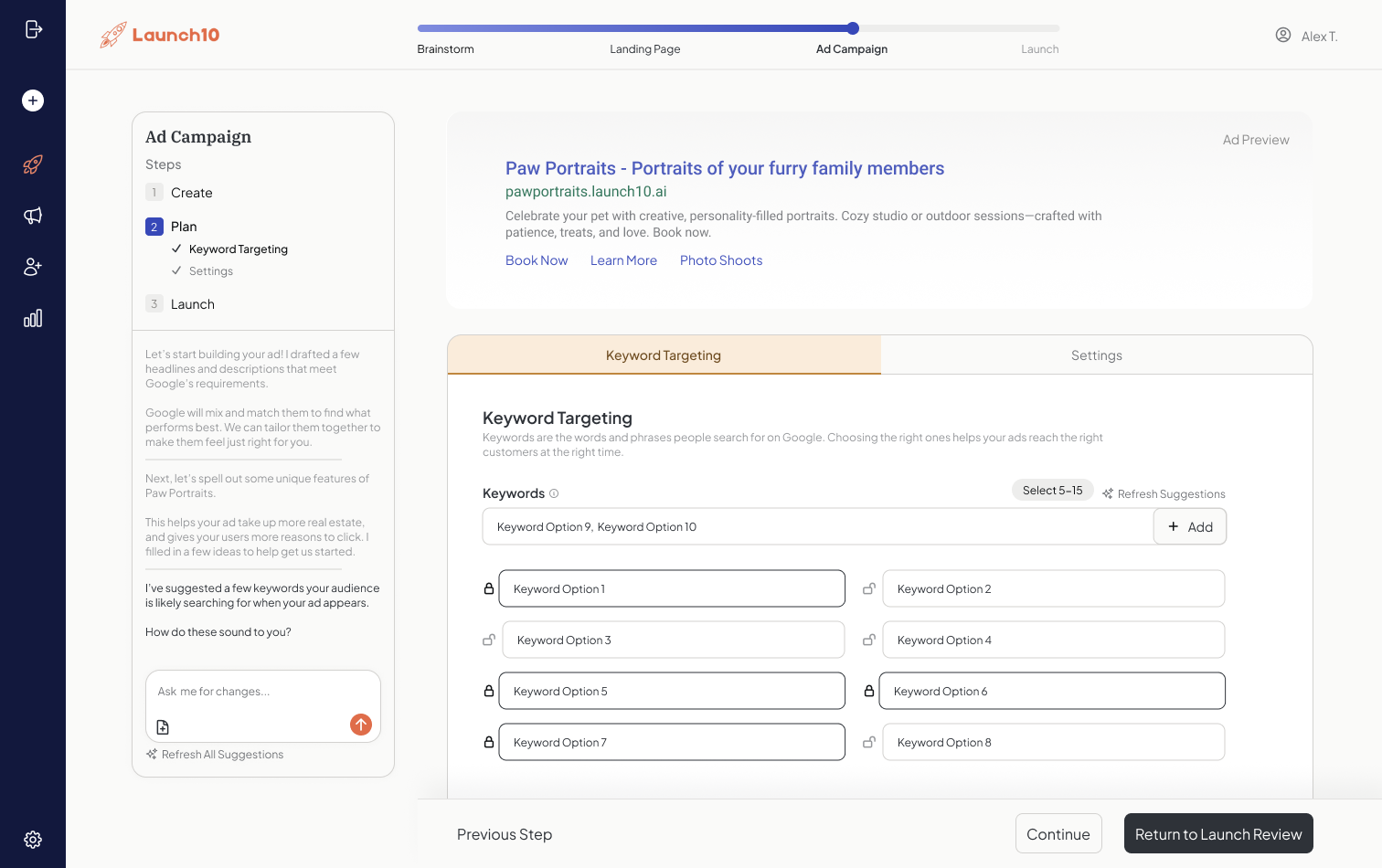
| Weekly optimization recommendations | Included — plain-English decisions | Not available |
Unbounce’s strength is clearly in page building and on-page optimization. Their Smart Traffic feature, which uses AI to route visitors to the page variant most likely to convert, is genuinely innovative — AI-optimized landing pages tend to convert better than a single static page. But Smart Traffic optimizes what happens on the page. It doesn’t create the ad that brings people to the page in the first place, and it doesn’t track what happens after they convert.
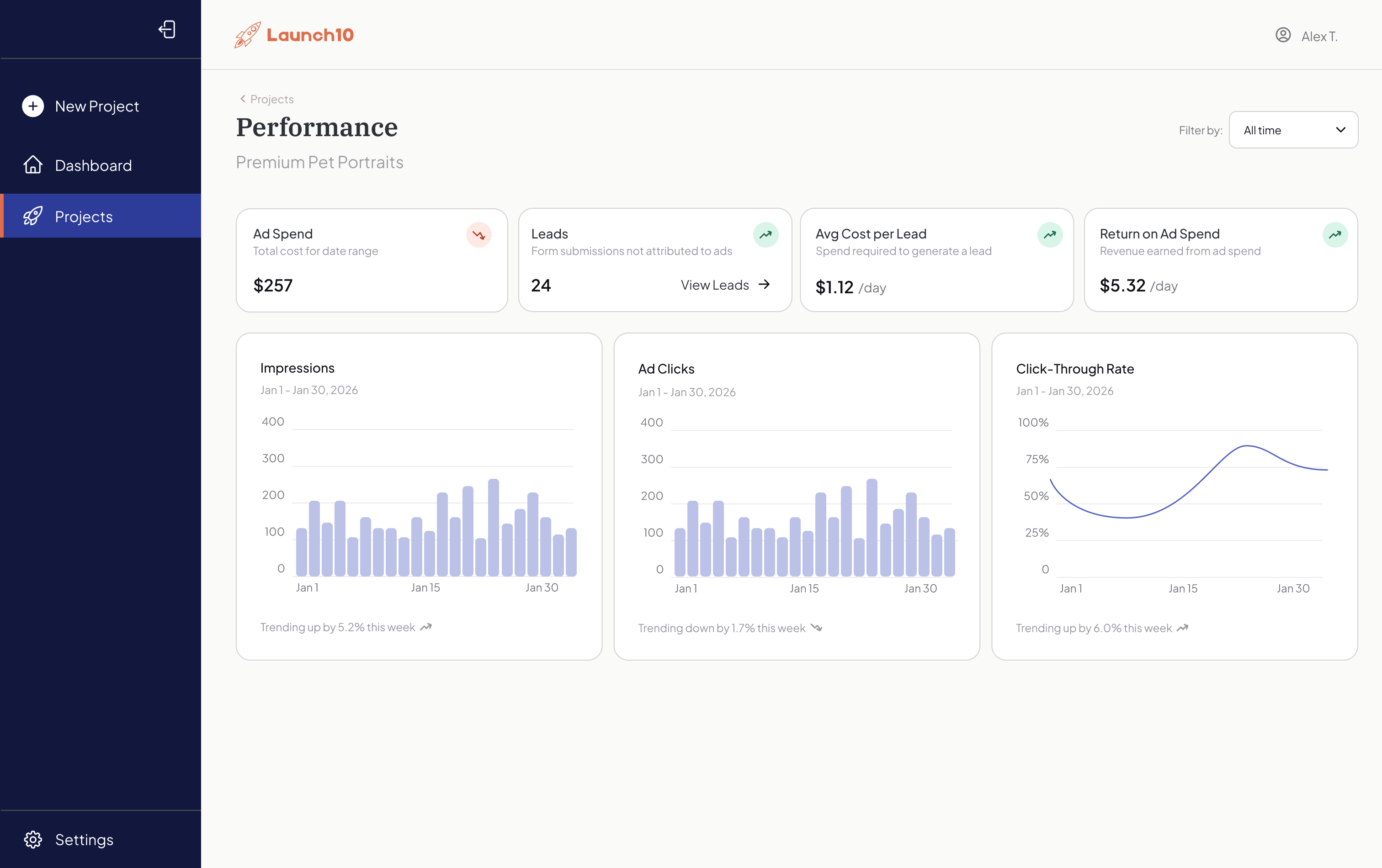
For most small businesses, the hard part isn’t the landing page — it’s everything around it: building the ads, managing the spend, and proving what actually drove revenue.
Pricing Comparison: Sticker Price vs. Total Cost
Unbounce’s sticker price looks straightforward until you realize it covers only one piece of what you need. Their Build plan starts at $99/month for landing pages with up to 20,000 visitors and 500 conversions. The Experiment plan at $149/month adds A/B testing. Optimize at $249/month includes Smart Traffic. And Concierge starts at $649/month for high-volume accounts. Launch10’s pricing starts at $59/month for the complete campaign.
| Plan Tier | Launch10 | Unbounce |
|---|---|---|
| Entry-level | Starter — $59/mo | Build — $99/mo |
| Mid-tier | Growth — $119/mo | Experiment — $149/mo |
| Advanced | Pro — $299/mo | Optimize — $249/mo |
| Enterprise | — | Concierge — $649/mo |
| What’s included | Landing page + Google Ads + tracking + analytics | Landing pages only (ads, tracking, analytics are extra) |
But sticker price is misleading. The real question is: what does it actually cost to get a customer? With Unbounce, you still need to create and manage Google Ads campaigns. Small businesses typically pay $500-$5,000/month for professional Google Ads management. Even DIY management using a tool like Optmyzr or Adzooma adds $100-$500/month. Then you need conversion tracking — either set it up yourself with Google Tag Manager (free but requires technical knowledge) or hire a developer ($500-$2,000 one-time).
Total Cost of Ownership: A Realistic Breakdown
Here’s what a realistic monthly cost looks like for a small business using each platform to actually acquire customers from Google Ads.
| Cost Component | Launch10 (Starter) | Unbounce (Build) + Additional Tools |
|---|---|---|
| Platform subscription | $59/mo | $99/mo |
| Google Ads management | Included | $500-$2,000/mo (agency) or $100-$500/mo (DIY tool) |
| Conversion tracking setup | Included | $500-$2,000 one-time (developer) or free (DIY) |
| Analytics/reporting tool | Included | $0-$300/mo (Google Analytics is free but limited; Databox, Whatagraph, etc.) |
| Estimated monthly total | $59/mo | $199-$2,799/mo |
Even in the most conservative scenario — you manage Google Ads yourself using free tools and set up tracking on your own — Unbounce still costs $99/month for a landing page that doesn’t generate a single visitor on its own. With Launch10, $59/month gets you the page, the ads driving traffic to it, the tracking proving what works, and the dashboard showing your ROI. That’s not a value comparison — it’s a category difference.
Time to Launch: Minutes vs. Weeks
Launch10 gets you from zero to a live campaign — landing page, Google Ads, and conversion tracking — in under 10 minutes. No exaggeration. You answer a few questions about your business, and the AI builds everything. Unbounce can get you a landing page in a few hours if you’re comfortable with their builder, but that’s step one of a multi-step process that typically takes 2-4 weeks when you include ad setup and tracking configuration.
The average small business spends many hours setting up their first Google Ads campaign and configuring conversion tracking correctly. Many small businesses abandon Google Ads within a few months due to complexity — not because ads don’t work, but because the setup and management burden is too high. Launch10 eliminates that burden entirely by automating the parts that trip people up.
What the First Week Looks Like
With Unbounce, expect to spend 15–40 hours in your first week setting up a page, connecting tools, and configuring tracking. With Launch10, setup takes under 10 minutes. With Launch10, day one means your campaign is live and collecting data. By day three, you’re seeing which keywords drive clicks. By day seven, you have enough conversion data to understand your cost per lead. With Unbounce alone, day one means you have a landing page. Days two through five, you’re setting up a Google Ads account, researching keywords, writing ad copy, and configuring bid strategies. Day six, you’re trying to install conversion tracking. Day seven, you’re troubleshooting why the tracking pixel isn’t firing. This isn’t hypothetical — it’s the lived experience of thousands of founders and business owners.
What You Still Need With Unbounce
Running Google Ads with Unbounce requires four additional tools or services: a Google Ads account and campaign manager, keyword research, conversion tracking setup, and ongoing optimization — adding $500–$2,000+/month to your costs. Here’s the complete list of what you need to set up, configure, and manage alongside Unbounce to actually acquire customers through paid search in 2026.
Google Ads account: You’ll need to create and verify a Google Ads account, set up billing, configure conversion goals, and build your first campaign. Google’s ad platform has over 150 settings per campaign — location targeting, bid strategies, ad scheduling, device targeting, audience segments, keyword match types, negative keywords, ad extensions, and more. Advertisers who tune these settings rather than relying on defaults typically pay less per click.
Keyword research: You need to find the right keywords to bid on. Tools like SEMrush ($139/mo), Ahrefs ($129/mo), or Google’s free Keyword Planner can help, but interpreting the data requires experience. WordStream’s analysis of 15,000+ accounts found that the average business wastes $1,127 per month in Google Ads spend.
Conversion tracking: Without proper tracking, you can’t tell which ads or keywords generate actual leads versus just clicks. Setting up Google Ads conversion tracking requires placing code on your site, configuring conversion actions in Google Ads, and testing that events fire correctly. WordStream’s same study found that 29% of accounts recorded zero conversions over 90 days — often because conversion tracking was never set up or was misconfigured.
Ongoing optimization: Google Ads isn’t set-and-forget. Effective campaigns need weekly keyword adjustments, bid management, negative keyword additions, and ad copy testing. Actively managed campaigns tend to deliver meaningfully better ROI than unmanaged ones.
Where Unbounce Genuinely Excels
A fair comparison requires acknowledging Unbounce’s real strengths. Their drag-and-drop builder is one of the most polished in the industry, with pixel-level design control that marketing teams and agencies genuinely need. If you have a designer on staff and want complete creative freedom, Unbounce’s builder gives you that in a way that AI-generated pages don’t.
Unbounce’s A/B testing is also mature and battle-tested. You can test headlines, images, entire layouts, and form configurations with statistical significance calculations built in. Their Smart Traffic feature goes further — it uses machine learning to automatically route each visitor to the variant most likely to convert based on attributes like device, location, and referral source. According to Unbounce, Smart Traffic can improve conversion rates by up to roughly 30% compared to a single page variant.
Their pop-up and sticky bar tools are valuable for existing websites that want to capture leads without building a new page. If you already have a high-traffic website and want to add conversion elements on top of it, that’s a use case Launch10 doesn’t directly address. And their integration ecosystem is extensive — connections to CRMs, email platforms, and analytics tools make Unbounce fit neatly into an established marketing stack.
When Unbounce Is the Better Choice
Unbounce is the right tool if your team already manages Google Ads campaigns effectively and you need a dedicated, high-control landing page builder. Specifically, choose Unbounce if you have a marketing team or agency managing paid media, your ad accounts are already performing and you just need better post-click experiences, you want pixel-level design control over landing pages, or you need pop-ups and sticky bars for an existing high-traffic website.
If you’re spending $5,000+ per month on Google Ads with a team that knows how to manage it, Unbounce’s page builder and Smart Traffic can absolutely improve your conversion rates. For enterprise marketing teams running complex multi-variant tests across dozens of landing pages, Unbounce’s Optimize or Concierge plans provide the infrastructure to do that at scale.
When Launch10 Is the Better Choice
Launch10 is the right tool if you need customers, not just landing pages. Specifically, choose Launch10 if you don’t have time to learn Google Ads, a founder validating a business idea who needs leads fast, a home services business that wants to start acquiring customers this week, or anyone who’s tried Google Ads before and given up because it was too complex.
Many small businesses handle all marketing activities themselves — no agency, no marketing hire, no dedicated team. For these businesses, the question isn’t “which page builder has better A/B testing?” It’s “how do I get customers without becoming a digital marketing expert?” Launch10 answers that question directly. For $59/month, you get what would otherwise require three to five separate tools and 20+ hours of setup time.
The Bottom Line
Unbounce optimizes whoever shows up. Launch10 brings the right people to the page. Both are real problems; very few businesses have both at the same time. Unbounce is one of the most polished landing page builders ever made — if your bottleneck is conversion rate on existing traffic, their A/B engine and Smart Traffic are best-in-class and we’d lose that comparison every time.
But for most small businesses, conversion rate isn’t the bottleneck — finding the right people in the first place is. The keyword research, the ad copy, the extensions, the tracking, the audience signal in the page itself, the weekly decisions about what to cut and what to test. Unbounce assumes that work is already done by you or your agency. Launch10 assumes it isn’t, and does it. If you already run successful Google Ads campaigns and want a better page, Unbounce is excellent at that. If the campaign is the thing you don’t have, Launch10 delivers it end to end starting at $59/month, in under 10 minutes, with zero technical expertise required.
HubSpot’s research on marketing tool sprawl found that consolidating tools saves meaningful time on tool management alone, and case studies show customer acquisition cost reductions after consolidation. That’s not just a cost savings — it’s time back to run your actual business. See how connecting your landing page to ads changes everything.
Related reading
- Unbounce pricing breakdown — detailed Unbounce tier costs and Smart Traffic gating
- Launch10 vs Leadpages — adjacent comparison against another top page builder
- Connecting your landing page and ads — why integrated builds outperform stitched stacks
Frequently asked questions
Can I use Unbounce and Launch10 together?
Is Unbounce's Smart Traffic better than Launch10's AI optimization?
Does Launch10 offer A/B testing like Unbounce?
What if I already have a Google Ads account?
Is Unbounce worth it if I only need landing pages?
How do Unbounce and Launch10 landing pages compare in conversion rates?

Co-Founder & CEO, Launch10
Greg Hockenbrocht is the Co-Founder and CEO of Launch10. Before Launch10, he was on the executive leadership team at Fundera through its acquisition by NerdWallet, where he led Growth & New Ventures following the company's IPO. Through Illuminated Ventures and work with founders and business owners, he saw a need for Launch10 to help bring clarity, confidence, and ease to digital marketing.