
Launch10 vs Leadpages: Why a Page Isn't Enough

Leadpages and Launch10 share exactly one thing in common: they both create landing pages. After that, they’re built for different jobs and different readers.
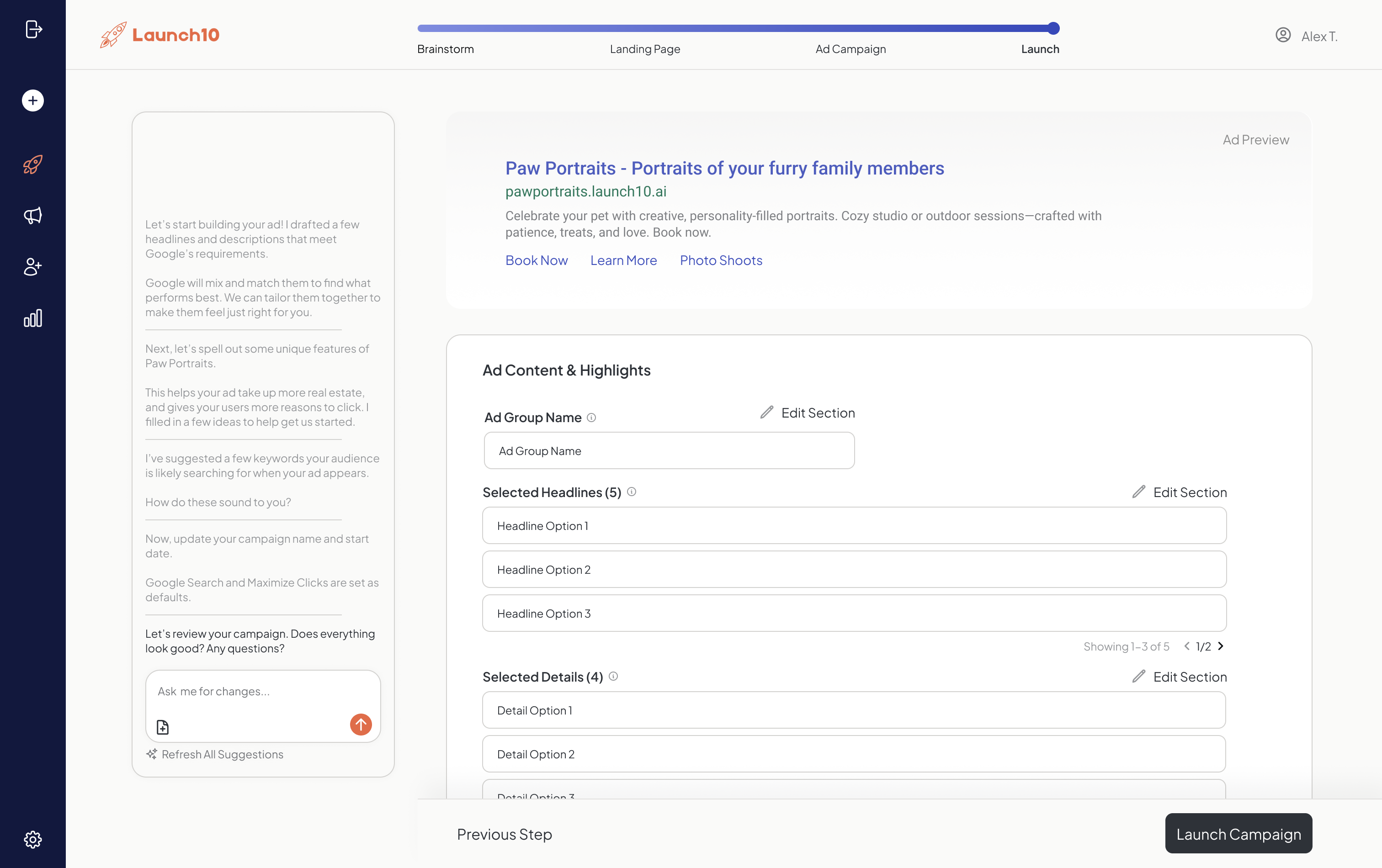
The honest framing: Leadpages is a tool for marketers who already have a campaign. Launch10 is a campaign for people who don’t. Leadpages assumes you already know which keyword to bid on, which audience to target, what the offer is, and how to wire conversion tracking through Google Tag Manager. It hands you a great execution surface and trusts you for the rest. Launch10 starts further upstream — we tell you what to bid on, write the ad copy and extensions, build the page as an audience signal, install the tracking, and give you a short list of decisions every week in plain English. Different shapes of work, different shapes of buyer.
This comparison breaks down exactly when each tool makes sense, with real pricing, features, and total cost analysis for 2026.
The Quick Verdict
Choose Leadpages if you already run marketing — you have keywords you trust, ad copy you’ve tested, a tracking stack that works, and you mostly need a fast, affordable execution surface for pages, pop-ups, and Stripe checkout. For experienced marketers who already know what to do, Leadpages is a legitimately good tool and we’d lose that comparison every time.
Choose Launch10 if the upstream work is the part you don’t have. You don’t have a keyword list. You don’t have ad copy. You haven’t wired conversion tracking. You’re not going to spend the next three weeks learning Google Ads. You want the campaign — the keywords, the page, the ads, the tracking, and weekly recommendations on what to change — handled as one system. A landing page without a campaign behind it is a storefront with no road leading to it, and that’s the fundamental gap Leadpages assumes you’ll fill yourself.
Here’s the data point that matters most: according to WordStream’s Google Ads research, accounts with proper intent alignment (including negative keywords and dedicated landing pages) achieve conversion rates nearly 3x higher than accounts without these optimizations. The reason is straightforward — when your ad copy, keyword targeting, and landing page messaging are aligned, visitors arrive with the right expectations. Leadpages gives you the page. Launch10 gives you the alignment. The difference shows up directly in your cost per lead.
Feature Comparison: What Each Platform Actually Does
This table covers every feature relevant to customer acquisition. Notice the pattern: Leadpages covers the “page” part of the equation, while Launch10 covers the entire journey from search query to paying customer.
| Feature | Launch10 | Leadpages |
|---|---|---|
| Landing page builder | AI-generated, conversion-optimized | Drag-and-drop (Page Studio) with templates |
| Website builder | Landing pages only | Full website builder with multiple pages |
| Google Ads campaign creation | Included — built automatically | Not available |
| Google Ads management | Included — AI-optimized | Not available |
| Conversion tracking | Automatic — end-to-end | Basic page-level analytics only |
| Analytics dashboard | Impressions → clicks → conversions → cost per lead | Page views, unique visitors, conversion rate |
| A/B testing | AI-driven optimization | Unlimited A/B testing on all plans |
| Pop-ups and alert bars | Not available | Included on all plans |
| Checkout / payments | Not available | Stripe integration for payments |
| Custom domains | Available | 1 domain (Standard), 3 domains (Pro) |
| Time to full campaign launch | Under 10 minutes | Hours for page; weeks for full campaign with ads |
| Technical skill required | None | Low for pages; high for ads and tracking |
| Keyword research with real cost data | Included | Not available |
| Weekly optimization recommendations | Included — plain-English decisions | Not available |
Leadpages deserves credit for including A/B testing on all plans — many competitors lock it behind premium tiers. Their Stripe checkout integration is also genuinely useful for selling digital products or services directly from a landing page without needing a separate e-commerce platform. For businesses that primarily sell through their website, that’s a real advantage. But for businesses that need to find customers, not just convert ones who already arrived, the feature gap is significant.
Pricing Comparison
On sticker price alone, Leadpages looks like the winner. Their Standard plan starts at $49/month ($37/month billed annually), making it one of the most affordable landing page builders on the market. Launch10’s Starter plan is $59/month. But this comparison only tells part of the story — it’s like comparing the price of a car engine to the price of a complete car.
| Plan | Launch10 | Leadpages |
|---|---|---|
| Entry-level | Starter — $59/mo | Standard — $49/mo ($37/mo annually) |
| Mid-tier | Growth — $119/mo | Pro — $99/mo ($74/mo annually) |
| Advanced | Pro — $299/mo | Advanced — custom pricing |
| Landing pages included | Per plan allocation | 5 (Standard), Unlimited (Pro) |
| What’s included | Page + ads + tracking + analytics | Pages + pop-ups + alert bars + checkout |
Leadpages’ Standard plan limits you to 5 landing pages with 1 custom domain. Their Pro plan at $99/month unlocks unlimited pages and 3 domains. That’s reasonable pricing for a page builder — but it’s only a page builder. The average small business that runs Google Ads alongside landing pages spends an additional $500-$1,500/month on ad management tools and services. Launch10’s pricing includes everything.
WordStream’s analysis found that 29% of Google Ads accounts recorded zero conversions over 90 days — a strong indicator that conversion tracking is either missing or broken for a significant share of advertisers.
The “Page Isn’t Enough” Problem
A landing page alone cannot acquire customers — it’s one step in a seven-step paid search chain that includes keyword research, ad creation, bid management, tracking, attribution, and optimization. The page itself might be beautiful, the copy might be perfect, and the form might work flawlessly — but none of that matters if nobody sees it. This is the core problem with using Leadpages (or any standalone page builder) as your primary customer acquisition tool. The page is one step in a multi-step process, and it’s not even the hardest step.
Here’s the full chain you need to acquire a customer through paid search: keyword research → ad creation → bid management → landing page → conversion tracking → analytics → optimization. Leadpages handles one link in that seven-link chain. You need to build and manage the other six yourself. According to Google’s Economic Impact Report, businesses earn an average of $8 in profit for every $1 spent on Google Ads — but only when campaigns are properly set up and managed. Poorly managed campaigns often generate negative ROI, which is why understanding Google Ads fundamentals is so critical.
What You Need Alongside Leadpages to Actually Get Customers
If your goal is to acquire customers through paid advertising — which is how most small businesses grow in 2026 — here’s what you’ll need to set up, pay for, and manage on top of your Leadpages subscription.
Google Ads account and campaign setup: Creating a Google Ads account is free, but building an effective campaign requires keyword research, ad copywriting, bid strategy selection, audience targeting, and negative keyword configuration. Building an effective campaign requires keyword research, ad copywriting, bid strategy selection, audience targeting, and negative keyword configuration — a process that takes most people several days of work. And WordStream’s analysis found that the average Google Ads account wastes $1,127 per month on non-converting spend.
Ad management (ongoing): Google Ads campaigns need weekly attention — adjusting bids, pausing underperforming keywords, testing new ad copy, and managing budget allocation. Hiring a freelancer costs $500-$2,000/month. Using a DIY tool like Optmyzr adds $208-$498/month. Managing it yourself takes 5-10 hours per week if you know what you’re doing, and far longer if you’re learning.
Conversion tracking: Without tracking, you can’t tell which ads generate leads and which waste money. Leadpages offers basic page-level analytics (views, visitors, conversion rate), but it doesn’t integrate with Google Ads conversion tracking natively. You’ll need to set up Google Tag Manager, configure conversion events, and verify that everything fires correctly. WordStream’s analysis of 15,000 accounts found that 29% recorded zero conversions over a 90-day period — often because conversion tracking was never set up. Without tracking, you’re making budget decisions based on incomplete data.
Analytics and reporting: Leadpages shows you page-level metrics. But to understand your full campaign — which keywords produce the cheapest leads, which ad copy drives the most conversions, what your actual cost per customer is — you need additional analytics tools. Google Analytics 4 is free but complex. Tools like Databox ($72/mo), Whatagraph ($199/mo), or AgencyAnalytics ($79/mo) make reporting easier but add cost.
“Businesses earn an average of $8 in profit for every $1 spent on Google Ads — but only with proper campaign setup and management.” — Google Economic Impact Report
Total Cost of Ownership
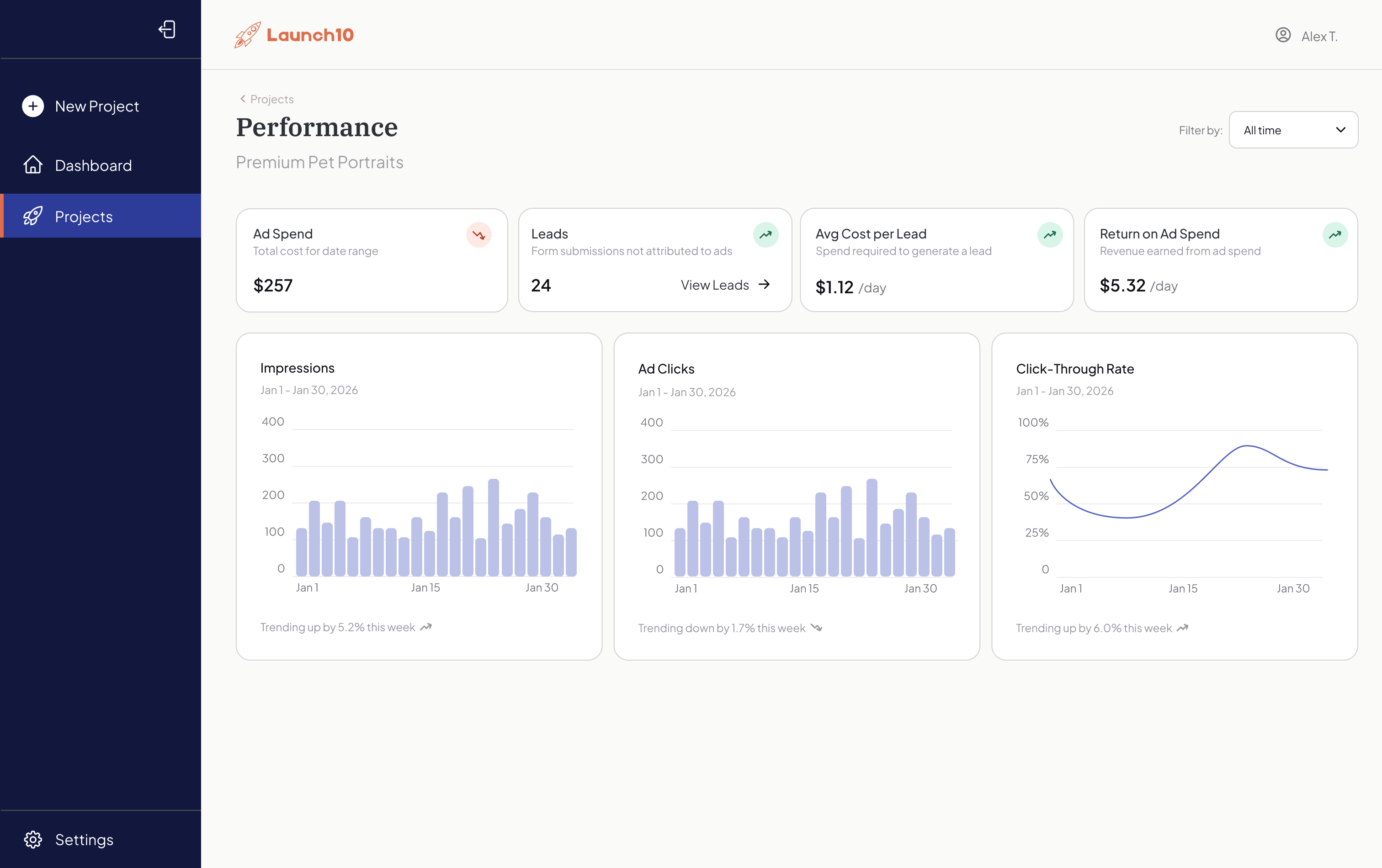
Launch10 costs $59/month for a complete campaign. Replicating the same capability with Leadpages plus additional tools runs $257-$2,747/month. Let’s calculate what it actually costs per month to acquire customers using each platform, including all the tools and services needed to run a complete paid acquisition campaign.
| Cost Component | Launch10 (Starter) | Leadpages (Standard) + Additional Tools |
|---|---|---|
| Platform subscription | $59/mo | $49/mo |
| Google Ads management | Included | $500-$2,000/mo (agency) or $208-$498/mo (DIY tool) |
| Conversion tracking setup | Included | $500-$2,000 one-time or DIY (10+ hours) |
| Analytics/reporting | Included | $0-$199/mo (free to mid-tier tool) |
| Monthly total (conservative) | $59/mo | $257-$2,747/mo |
The math is stark. Even the most budget-conscious DIY setup — Leadpages Standard ($49) plus a basic ads management tool ($208) — costs $257/month before you factor in learning time and setup costs. Launch10 at $59/month includes everything those tools provide, configured and optimized by AI. That’s a 77% cost reduction in the most conservative scenario. For a small business with limited budget, that difference compounds every single month.
Where Leadpages Genuinely Excels
Leadpages has real strengths that matter for certain use cases. Their Stripe checkout integration turns landing pages into simple storefronts — if you sell courses, consulting sessions, or digital products, you can go from page to payment without a separate e-commerce platform. Leadpages reports that their checkout pages process a substantial volume of transactions.
Their page builder, recently rebuilt as Page Studio, offers responsive per-device editing with precise positioning controls. The page load times they report are genuinely fast — and faster-loading pages tend to hold visitors better and bounce less. Fast pages convert better, and Leadpages takes speed seriously.
Leadpages also offers over 90 native integrations — HubSpot, Klaviyo, Mailchimp, Stripe, Zapier, and more. If you’re building a content marketing funnel where traffic comes from blog posts, social media, or email campaigns, Leadpages connects smoothly to the tools managing those channels. Their pop-up and alert bar tools add conversion elements to any existing website. And their pricing is genuinely affordable for what you get — $37/month (annually) for a landing page builder with A/B testing is hard to beat.
When Leadpages Makes Sense
Leadpages is the right tool for businesses that don’t need paid advertising infrastructure. Specifically, choose Leadpages if you’re building an email list and driving traffic from organic sources like social media or content marketing. It’s also a good fit if you sell digital products or services directly and need Stripe checkout on your landing pages, if you want a simple website builder that’s cheaper than Squarespace or WordPress hosting, or if you need pop-ups and alert bars for an existing website to capture more leads from current traffic.
Content Marketing Institute reports that a large majority of B2B marketers use organic social media to distribute content — and for many businesses, content and organic channels are the primary lead source. If that’s your business, Leadpages’ affordable page builder with built-in A/B testing is perfectly suited. You don’t need Google Ads infrastructure if you’re not running Google Ads.
When Launch10 Makes Sense
Launch10 is the right tool when your goal is customer acquisition through paid search — which, for most local and service-based businesses, is the fastest path to revenue. Choose Launch10 if you want customers this week and don’t have time to learn Google Ads, if you’re a home services business — plumber, electrician, roofer, landscaper — competing for local customers, if you’re a founder validating a new product and need leads to prove demand, or if you’ve tried running ads before and wasted money because the setup was too complicated.
Google has reported that 46% of searches have local intent — people looking for businesses near them. For those searches, Google Ads is the most direct path to visibility. Leadpages can’t get you that visibility. Launch10 can, and it does it automatically. The difference between having a landing page and having a customer acquisition campaign is the difference between hoping people find you and making sure they do. This is why connecting your page to ads matters.
“46% of all Google searches have local intent — people actively looking for nearby businesses.” — Google, via Search Engine Roundtable
The Bottom Line
Leadpages and Launch10 serve different readers. Leadpages is built for marketers who already know what to do — they want execution speed and a page that ships. Launch10 is built for everyone upstream of that: the business owner, the founder, the operator who doesn’t have a keyword list, hasn’t written ad copy, and hasn’t wired conversion tracking, and would rather not become an expert in any of those.
If you already run marketing and want a fast, affordable execution surface, Leadpages is a legitimately good tool and the $10/month difference doesn’t matter to you — what you needed was the page builder and you have it. If the upstream work is the part you don’t have, the same $10/month gap buys you Google Ads campaign creation, automatic conversion tracking, attribution from click to customer, and weekly recommendations in plain English. No other platform on the market offers that value equation in 2026.
The question isn’t whether Leadpages or Launch10 is better. It’s whether the work you came to do is executing a campaign or running one. Different jobs, different tools.
Related reading
- Leadpages pricing breakdown — detailed Leadpages tier-by-tier cost and feature analysis
- Launch10 vs Unbounce — adjacent comparison against another top page builder
- Connecting your landing page and ads — why the integrated build matters
Frequently asked questions
Can Leadpages integrate with Google Ads?
Is Leadpages good for local businesses?
Does Launch10 offer checkout or payment processing like Leadpages?
Can I switch from Leadpages to Launch10?
What if I want both a website and Google Ads?
Which platform has better templates?

Co-Founder & CEO, Launch10
Greg Hockenbrocht is the Co-Founder and CEO of Launch10. Before Launch10, he was on the executive leadership team at Fundera through its acquisition by NerdWallet, where he led Growth & New Ventures following the company's IPO. Through Illuminated Ventures and work with founders and business owners, he saw a need for Launch10 to help bring clarity, confidence, and ease to digital marketing.