How Launch10 Works: From Business Description to Live Ads

Launch10 Turns a Business Description Into a Complete Marketing Campaign in Three Steps
Launch10 works in three steps: you describe your business, the AI team builds your campaign, and you launch. The entire process takes under 10 minutes. When you’re done, you have a live landing page, an active Google Ads campaign, and fully configured conversion tracking — all connected and optimized as a single system. No design skills, no Google Ads expertise, no developer needed.
To understand why this matters, consider what the same process looks like without Launch10. Setting up a Google Ads campaign from scratch — including keyword research, ad copywriting, landing page creation, conversion tracking, and analytics — takes a skilled marketer many hours. For a business owner doing it for the first time, that number doubles. At an agency billing $175/hour, 25 hours of setup work costs $4,375 before a single ad runs. Launch10 compresses this into minutes, not weeks.
This post walks through exactly what happens at each step, which AI specialists do what, and what your finished campaign looks like. If you want the big-picture overview first, start with What is Launch10.
Step 1: Describe Your Business
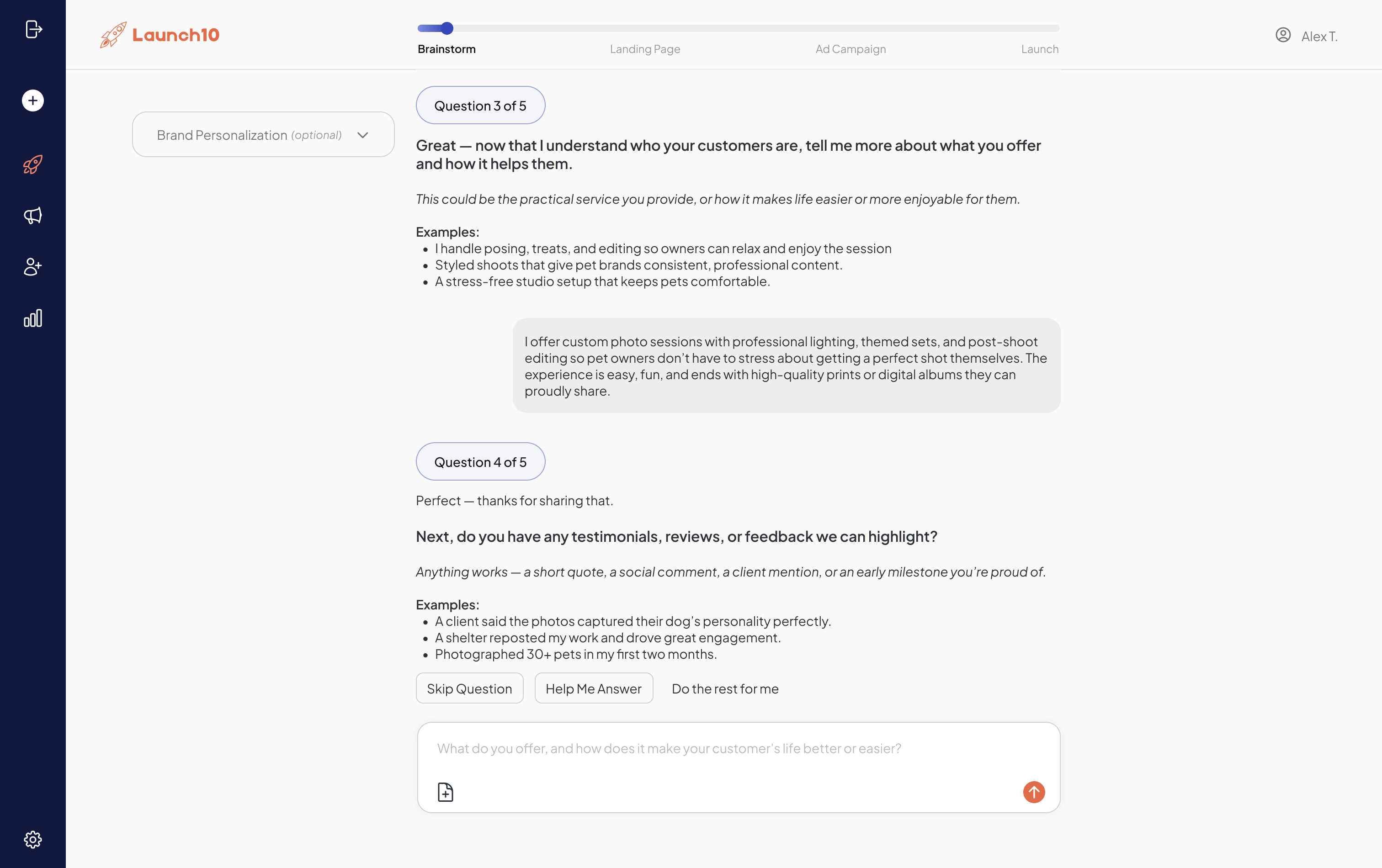
The process starts with a simple form. You tell Launch10 about your business in plain language — what you do, who your customers are, what area you serve, and what makes you different. There are no templates to choose from, no complicated questionnaires, and no design decisions to make at this stage. Think of it like briefing a marketing team: you give them the context, and they build the campaign.
This business description is the seed that drives everything Launch10 creates. The more specific you are, the better your results. For example, “I’m a plumber” produces a decent campaign. “I’m a licensed plumber in Austin, TX specializing in emergency drain repair and water heater installation for homeowners, with 15 years of experience and same-day service” produces a significantly better one — because the AI has more material to work with for targeting, copy, and differentiation.
Ads with specific, relevant messaging tend to achieve higher Quality Scores than generic ads. Higher Quality Scores directly translate to lower cost-per-click — Google rewards relevance. A specific business description helps Launch10’s AI create that specificity from the start.
Step 2: The AI Team Builds Your Campaign
Once you submit your description, Launch10’s team of 10 AI specialists gets to work simultaneously. Each specialist handles a different component of your marketing campaign, and they collaborate to ensure everything is consistent and connected. Here’s what each one does and why it matters.
The AI Strategist
The Strategist analyzes your business description and makes the high-level decisions that shape your entire campaign. It identifies your target audience, determines the best campaign approach, selects geographic targeting, and defines the messaging framework. For a roofer in Denver, the Strategist might determine that “emergency roof repair” and “roof replacement” are two distinct audiences with different urgency levels, and structure the campaign accordingly. This strategic layer is what separates Launch10 from tools that just generate copy — it starts with the same kind of audience analysis a $200/hour marketing director would do.
The AI Copywriter and Brand Voice
The Copywriter generates all the text for your landing page: the headline, subheadlines, value propositions, feature descriptions, trust signals, and calls-to-action. It writes conversion-focused copy based on principles backed by decades of direct response marketing research. An eye-tracking study from Missouri S&T found that users spend an average of 5.59 seconds on written content before shifting focus — meaning your headline and subheadline have roughly five seconds to earn attention. The Copywriter optimizes for those first five seconds.
The Brand Voice specialist ensures everything reads consistently — the same tone, terminology, and personality across your landing page, ad headlines, and ad descriptions. Inconsistency between ad copy and landing page copy is one of the most common reasons for low Quality Scores and poor conversion rates.
The AI Page Designer
The Page Designer takes the copy and structures it into a conversion-optimized landing page layout. This includes hero section placement, visual hierarchy, CTA button positioning, mobile responsiveness, and page speed optimization. The page is built to follow the F-pattern reading behavior that eye-tracking research has validated across thousands of studies — critical information goes in the top-left, CTAs are positioned where attention naturally flows.
Google/SOASTA research found that 53% of mobile visits are abandoned if a page takes longer than 3 seconds to load. Launch10 pages are optimized for sub-2-second load times, because page speed directly impacts whether visitors stay long enough to convert.
The AI Ads Specialist
The Ads Specialist creates your Google Ads search campaign. This involves multiple components that would normally take a PPC manager 5–10 hours to build manually:
- Keyword research: Identifying the search terms your potential customers actually use. The average Google Ads account targets dozens to a few hundred keywords across multiple ad groups.
- Negative keyword lists: Blocking irrelevant searches that waste budget. Without negative keywords, the average campaign wastes a substantial share of spend on irrelevant clicks.
- Ad group structure: Organizing keywords into tightly themed groups so ad copy matches search intent.
- Ad copy: Writing responsive search ads with multiple headline and description variations. Google’s responsive search ads test up to 43,680 ad combinations to find the best-performing mix.
- Bid strategy: Selecting the right automated bidding approach based on your goals (leads, calls, form submissions).
- Geographic targeting: Setting the service area where your ads will show.
The AI Tracking Engineer
The Tracking Engineer is arguably the most valuable specialist in the Launch10 team, because conversion tracking is where most small businesses fail. WordStream’s analysis of over 15,000 Google Ads accounts found that 29% recorded zero conversions over a 90-day period — often because conversion tracking was never set up. That means nearly a third of advertisers are spending money on ads with no way to measure what’s working.
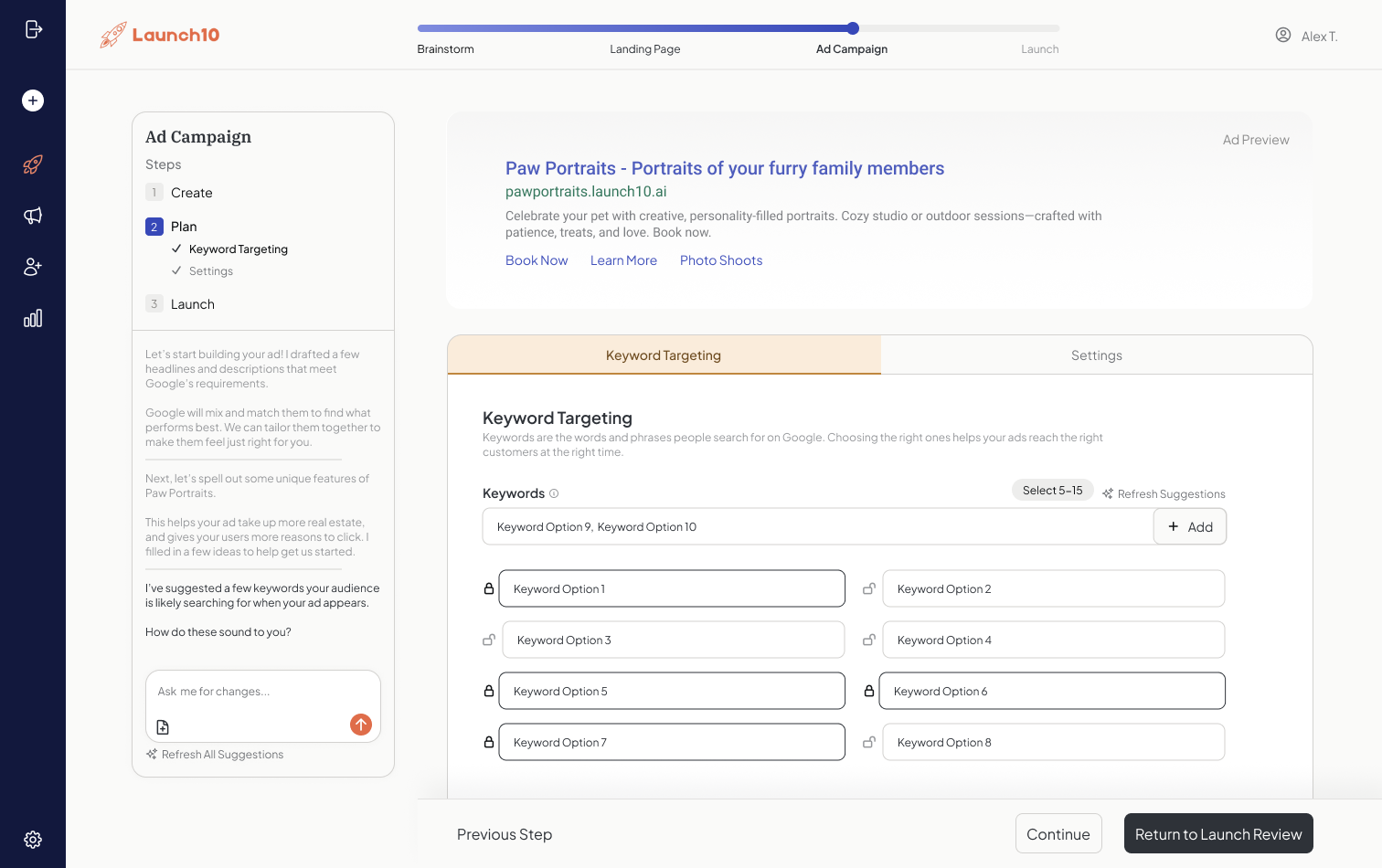
The Tracking Engineer automatically configures Google Ads conversion tracking for form submissions, phone calls (via tracked numbers), and other lead actions on your landing page. It connects these conversion events back to specific keywords and ads, so you know exactly which search terms are generating customers — not just clicks. This is the data that makes optimization possible, and Launch10 sets it up without you touching a line of code.
The AI Compliance and QA Specialists
Before anything goes live, the Compliance specialist checks your ads against Google Ads policies — prohibited content, trademark issues, landing page requirements, and editorial standards. Google removed 5.1 billion ads in 2024 (Google Ads Safety Report, 2025). Getting an ad disapproved delays your launch by days while you figure out what went wrong. The Compliance specialist catches these issues before submission.
The QA specialist tests your landing page across devices, verifies that tracking fires correctly, confirms that your ads link to the right page, and checks that forms and phone numbers work. This is the same testing a quality assurance engineer would perform, compressed into seconds.
Step 3: Review and Launch
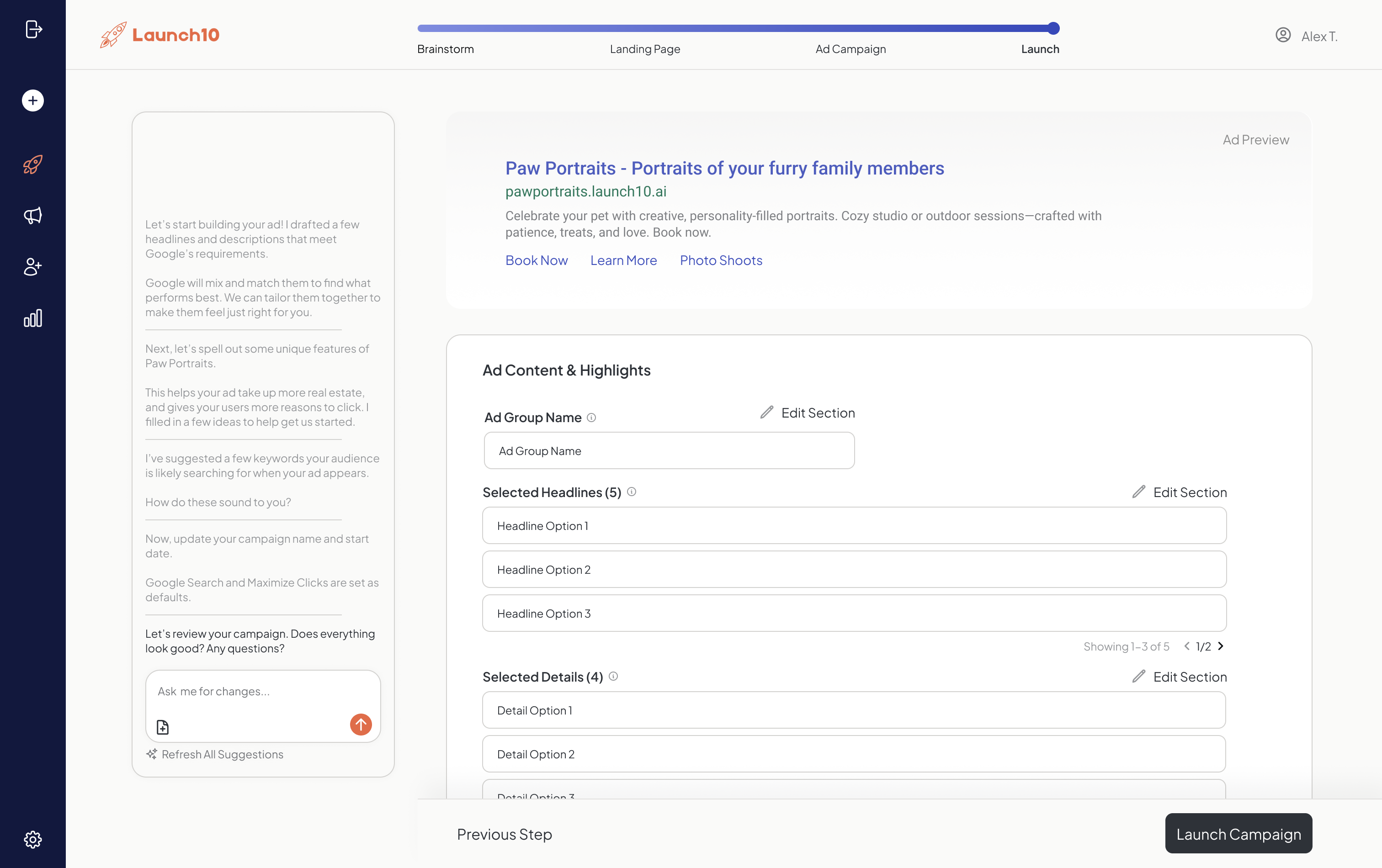
After the AI team finishes — typically in 2–3 minutes — you get a complete preview of everything that was created. You can review your landing page, read your ad copy, check your keyword list, and see your campaign settings. Nothing goes live until you approve it.
If you want to make changes, you can edit anything: swap a headline, adjust your service area, add a keyword, change the CTA text. The editing interface is designed for business owners, not marketers — plain language, clear options, no jargon. When you’re satisfied, you hit launch. Your landing page goes live immediately on a Launch10 subdomain (or your custom domain on Growth and Pro plans), and your Google Ads campaign is submitted for Google’s review, which typically takes 1–24 hours.
What Your Finished Campaign Looks Like
When a potential customer searches Google for something you offer — say, “emergency plumber Austin” — here’s what happens:
- Your ad appears at the top of Google search results with a headline that matches their search.
- They click your ad and land on a page specifically designed to convert that visitor — with messaging that mirrors what they searched for.
- They take action — fill out a form, click to call, or request a quote.
- The conversion is tracked — Launch10 records which keyword, ad, and campaign generated that lead, and sends the data back to Google Ads for optimization.
- Google’s algorithm learns — with conversion data flowing, Google can optimize your bids to show your ads to people most likely to become customers.
This is the connected campaign that agencies charge thousands to build. According to Google, advertisers with properly connected conversion tracking see up to 30% more conversions from the same spend compared to those tracking clicks alone. Why connecting your landing page and ads matters more than most businesses realize.
What Happens After Launch: The Performance Loop
After launch, two AI specialists continuously optimize your campaign: one monitors and adjusts your Google Ads campaign, the other tests landing page variations to improve conversion rates. Here’s how the performance loop works.
The AI Performance Analyst
The Performance Analyst monitors your campaign data continuously. It tracks impressions, clicks, cost-per-click, conversion rate, cost-per-lead, and quality score across every keyword and ad. Instead of logging into Google Ads and trying to parse a dashboard with 50+ metrics, you get a clear, actionable summary of what’s working and what’s not. The analyst identifies trends — like a keyword that’s getting clicks but no conversions, or an ad variation that’s outperforming others by 3x — and flags them for your attention.
The AI Optimizer
Based on the Performance Analyst’s findings, the Optimizer recommends specific changes: pause this underperforming keyword, increase the bid on this high-converting search term, test a new headline variation, add this negative keyword to block irrelevant traffic. Campaigns that are actively optimized in the first 30 days tend to achieve a lower cost-per-acquisition by day 90 than campaigns that are set and forgotten.
You can review and approve optimization suggestions, or on higher-tier plans, configure certain optimizations to run automatically. Either way, your campaign gets smarter over time as more data flows in.
How Editing and Iteration Works
You can edit any part of your campaign at any time — landing page copy, ad headlines, keywords, or targeting — through a simple dashboard interface without touching code. Here’s what’s editable:
- Landing page: Update headlines, rewrite sections, change images, modify your CTA, adjust layout.
- Ad copy: Edit headlines and descriptions, add new variations, pause underperformers.
- Keywords: Add new keywords, remove irrelevant ones, adjust match types.
- Campaign settings: Change geographic targeting, adjust daily budget, modify bid strategy.
Changes to your landing page go live immediately. Changes to your Google Ads go through Google’s standard review process (usually 1–24 hours). The key difference from doing this manually in Google Ads is that Launch10 keeps everything connected — if you change your primary service on the landing page, the system flags that your ad copy may need updating to maintain message match.
Businesses that A/B test their landing pages regularly tend to see meaningful conversion rate improvements over time. Launch10 makes testing accessible to businesses that don’t have a dedicated CRO team.
Time Savings: Launch10 vs. Manual Setup
The table below compares the time required to set up a complete marketing campaign — landing page, Google Ads campaign, and conversion tracking — using Launch10 versus doing it manually or through an agency.
| Task | Launch10 | Manual / DIY | Agency |
|---|---|---|---|
| Business and audience analysis | Automated (1 min) | 2–5 hours | 3–10 hours |
| Keyword research | Automated (1 min) | 3–8 hours | 3–5 hours |
| Landing page copywriting | Automated (1 min) | 4–12 hours | 5–15 hours |
| Landing page design and build | Automated (1 min) | 8–20 hours | 10–40 hours |
| Google Ads campaign creation | Automated (1 min) | 3–8 hours | 3–8 hours |
| Conversion tracking setup | Automated (1 min) | 4–8 hours | 2–4 hours |
| QA and policy review | Automated (1 min) | 1–3 hours | 1–2 hours |
| Total | Under 10 minutes | 25–64 hours | 27–84 hours (2–6 weeks calendar time) |
Even at the low end, doing it yourself takes 25 hours. At a $50/hour value of your time, that’s $1,250 of time invested — more than a year of Launch10’s Starter plan at $59/month. For agencies, 27 hours at $175/hour is $4,725 in setup fees alone, before any monthly management retainer. These are the economics that make Launch10 compelling for small businesses that need results now, not in six weeks.
What You Need to Get Started
To launch your first campaign on Launch10, you need three things:
- A business description: What you do, who you serve, and what area you cover. Two to three sentences minimum.
- A Google account: Launch10 connects to your Google Ads account (or helps you create one) to set up and manage your campaigns. You own the account and all the data.
- An ad budget: Your Google Ads spend is separate from your Launch10 subscription. Most small businesses start with $500–$2,000/month in ad spend, depending on their industry and market. The average small business spends a few thousand dollars per month on Google Ads, but you can start smaller and scale as you see results.
That’s it. No design assets, no brand guidelines document, no keyword spreadsheets. Visit the Launch10 homepage to start, and check the pricing guide to choose your plan.
Related reading
- What is Launch10? — the broader product overview and category positioning
- Launch10 pricing guide — what each plan includes, with credit and feature breakdowns
- Connecting your landing page and ads — the conceptual problem Launch10 solves end-to-end
Frequently asked questions
Can I use Launch10 if I already have a Google Ads account?
What if I don't like what the AI creates?
How much should I spend on Google Ads?
Does Launch10 work for businesses outside the United States?
How does Launch10 handle Google Ads billing?

Co-Founder & CEO, Launch10
Greg Hockenbrocht is the Co-Founder and CEO of Launch10. Before Launch10, he was on the executive leadership team at Fundera through its acquisition by NerdWallet, where he led Growth & New Ventures following the company's IPO. Through Illuminated Ventures and work with founders and business owners, he saw a need for Launch10 to help bring clarity, confidence, and ease to digital marketing.