
Google Ads for Contractors: Get More Project Calls

Google Ads work exceptionally well for contractors because they capture people at the exact moment they need help. When someone searches “emergency plumber near me” or “roof repair company,” they’re ready to hire. The average contractor running Google Ads sees a steady stream of qualified leads each week, with project values ranging from modest repairs to major renovations. However, success requires proper campaign structure, conversion tracking, and landing pages built for home-services businesses — the same fundamentals laid out in our small-business Google Ads guide.
Most contractors who struggle with Google Ads make three critical mistakes: they send traffic to generic websites instead of service-specific landing pages, they don’t track phone calls as conversions, and they target keywords that are too broad. The contractors who succeed focus on high-intent keywords like “[service] repair near me” and “[service] installation,” use dedicated landing pages for each service, and track every phone call to measure true ROI.
The key difference between profitable contractor campaigns and money-wasting ones is understanding search intent. Someone searching “how to fix a leaky faucet” wants information, not a plumber. Someone searching “emergency plumber 24 hour” wants to hire someone immediately. Successful contractor campaigns target bottom-funnel keywords where people are ready to buy, not research.
Why Contractors Waste Money on Google Ads (and the 3 fixes)
Most contractor Google Ads campaigns lose money because they’re set up like retail campaigns instead of service-based campaigns. Contractors need immediate phone calls, not website browsing sessions, but most campaigns optimize for clicks rather than calls.
The three most common mistakes are targeting informational keywords instead of buying keywords, using generic landing pages that don’t build trust for specific services, and failing to track phone calls as conversions. A roofing contractor targeting “roof replacement cost” will get traffic but few leads because searchers are price shopping, not ready to hire. The same contractor targeting “roof leak repair near me” will get fewer clicks but more qualified calls.
Generic landing pages kill contractor conversions because trust matters more in home services than other industries. A homeowner isn’t going to call an electrician based on a page that could belong to any contractor in any city. They need to see local credentials, specific service expertise, and proof that this contractor handles their exact problem. This is why contractors using service-specific landing pages convert substantially better than those using homepage traffic.
Phone call tracking is essential because the majority of contractor leads come through phone calls, not form submissions. Contractors who don’t track calls can’t optimize their campaigns properly and often pause profitable keywords because they can’t see the full conversion picture.
Which Types of Contractors Get the Best ROI From Google Ads
Emergency and repair services consistently outperform installation and renovation services on Google Ads because of search urgency. Plumbing repairs, HVAC breakdowns, and electrical emergencies generate immediate calls with high conversion rates. These services also command higher prices because customers need immediate solutions.
The contractors who see the strongest Google Ads performance are:
- Emergency plumbers - Moderate cost-per-click and strong conversion rates, with solid per-call values
- HVAC repair technicians - Higher cost-per-click, strong conversion rates, and higher-value repair calls
- Electrical contractors - Lower cost-per-click with dependable conversion rates on service calls
- Roofing contractors - Higher cost-per-click and lower conversion rates, offset by much larger project values
- General contractors - Mid-range cost-per-click and conversion rates, with project values ranging from small jobs to major builds
Kitchen and bathroom remodelers also perform well but require longer sales cycles and higher lifetime values to justify their premium cost-per-click. These contractors often need to nurture leads for several weeks before conversion.
The key factor determining Google Ads success for contractors is the urgency of the service. Emergency repairs convert immediately while renovation projects require multiple touchpoints and longer consideration periods.
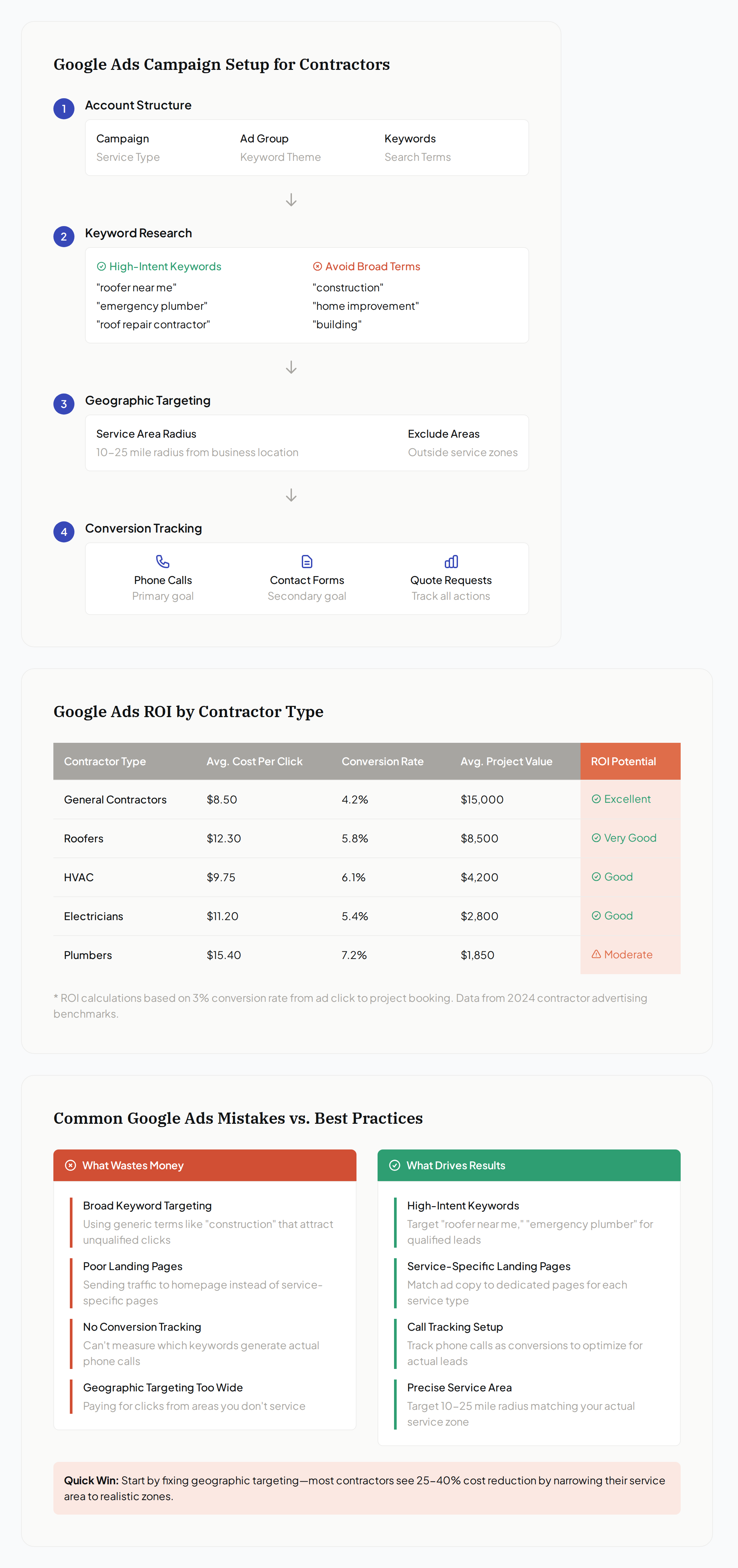
How to Set Up a Google Ads Campaign for a Contracting Business
Setting up profitable contractor campaigns requires a different approach than standard Google Ads campaigns because contractors need calls, not clicks. Start with location targeting that matches your actual service area, not just your city. If you service a 25-mile radius, set your location targeting to that exact distance to avoid wasted spend on areas you can’t serve.
Here’s the step-by-step campaign setup process:
-
Create service-specific campaigns - Run separate campaigns for each major service (plumbing repair, HVAC installation, electrical work) rather than one generic contractor campaign. This allows better budget control and keyword targeting.
-
Target high-intent keywords - Focus on keywords with clear buying intent: “[service] repair near me,” “emergency [service],” “[service] company,” and “[service] contractor.” Avoid informational keywords like “how to” or “DIY.”
-
Set up location extensions - Add your business address, phone number, and service area radius. Local contractors with complete location extensions tend to see higher click-through rates.
-
Enable call extensions and call-only ads - Most contractor leads come via phone, so make calling easy. Call-only ads often outperform standard ads for emergency services.
-
Create ad schedules matching your availability - Don’t run ads when you can’t answer calls. Emergency services can run 24/7 if you have after-hours coverage, but standard services should match business hours.
-
Set up conversion tracking for calls - Track calls longer than 60 seconds as conversions. This captures your true lead volume and helps Google optimize for phone calls rather than just clicks.
Campaign structure matters more for contractors than most businesses because service areas and response times directly impact profitability. A plumber who can’t service calls 30 miles away shouldn’t pay for clicks from that area.
What Your Landing Page Needs to Convert Contractor Leads
Contractor landing pages must build trust immediately because homeowners are inviting strangers into their homes to handle potentially dangerous work. Generic pages that could belong to any contractor won’t convert well because they don’t address the specific concerns people have about each service type.
Your landing page needs local credibility markers within the first screen: your service area, years in business, license numbers, and insurance information. Homeowners want to know they’re dealing with legitimate, local professionals, not national lead generation companies.
Service-specific content is crucial for conversion. An HVAC landing page should address heating and cooling problems specific to your climate zone, showcase the brands you work with, and explain your diagnostic process. A roofing page needs storm damage expertise, material options for your region, and warranty information. Generic contractor language kills trust.
Social proof drives contractor conversions more than most industries because the stakes feel higher to homeowners. Include recent customer photos (with permission), specific before/after examples, and reviews that mention the actual work performed. A review saying “John fixed my water heater quickly” converts better than “Great service!”
Phone numbers need to be prominent and clickable on mobile. Place your phone number in the header, repeat it near your main call-to-action, and consider a sticky mobile click-to-call button. Make it easier to call you than to comparison shop.
The most effective contractor landing pages focus on one service per page rather than trying to showcase everything you do. A page optimized for “emergency electrical repair” will always outperform a generic “electrical services” page because it matches the specific search intent.
Conversion Tracking for Contractors: Knowing Which Calls Came From Ads
Phone call tracking is essential for contractor Google Ads success because most leads call rather than fill out forms. Without proper call tracking, you’re flying blind on which keywords and ads actually generate business. Google Ads can track calls from ads and website calls using dynamic number insertion, but you need to set minimum call duration (typically 60-90 seconds) to filter out wrong numbers and quick hang-ups.
Set up Google Ads call reporting to track calls from ad extensions and calls to numbers on your landing pages. This requires adding Google’s call tracking code to your website and configuring call conversion tracking in your Google Ads account. Most contractors see that the majority of their qualified leads come through phone calls rather than forms.
Beyond Google’s built-in tracking, consider dedicated call tracking software if you run multiple marketing channels. Services like CallRail or CallTrackingMetrics provide detailed call recordings, caller ID, and attribution across all marketing sources. This helps you understand not just which ads generate calls, but which calls turn into actual jobs.
The key metrics contractors should track are: cost per call (not just cost per click), call duration, conversion rate from call to booked job, and lifetime value of customers acquired through Google Ads. A plumber might pay a premium per call, but if a healthy share of those calls book jobs, it’s profitable.
Revenue tracking requires connecting your call data to your job completion data. This might mean manually logging which calls became jobs in your first few months, then using that data to calculate your true cost per acquisition. Most successful contractor campaigns generate several dollars of revenue for every dollar spent on ads.
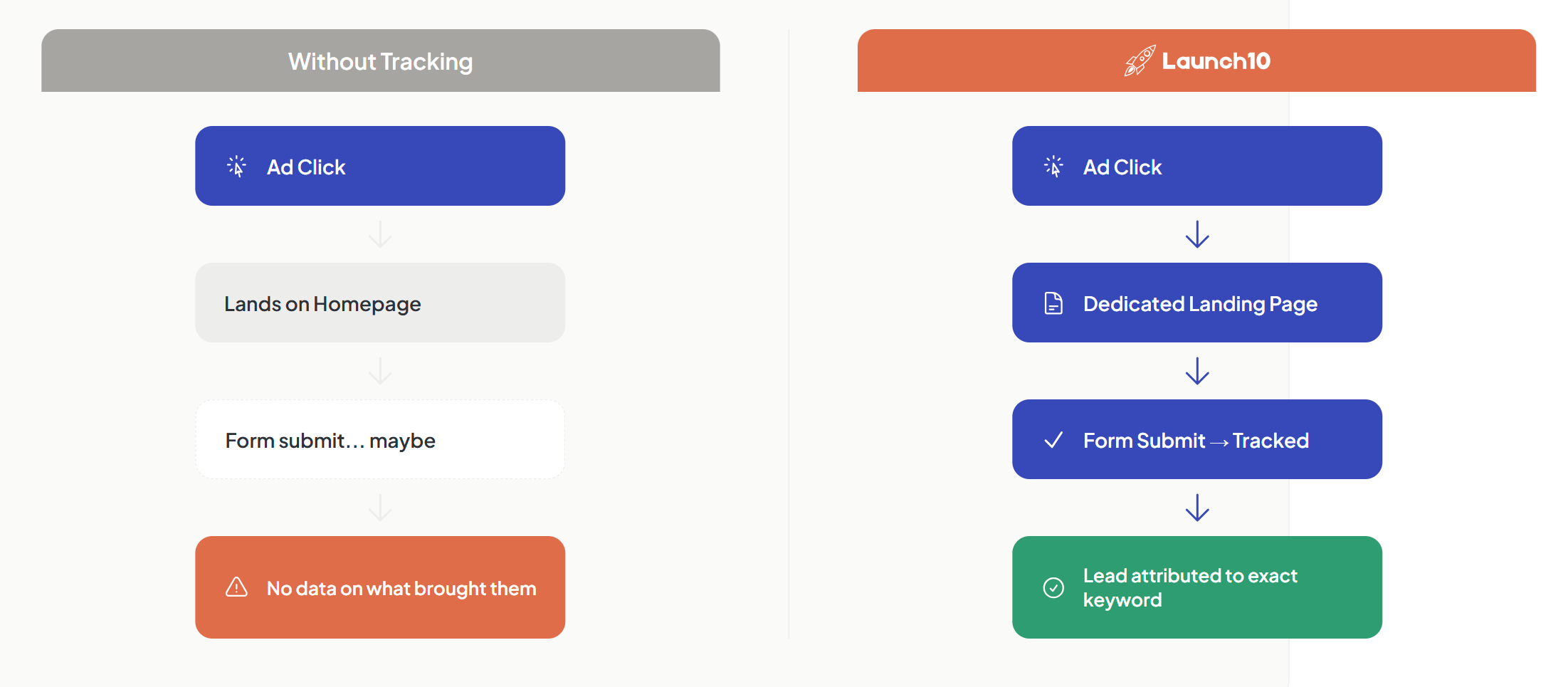
Launch10 is purpose-built AI for Google Ads that automatically sets up phone and form conversion tracking for contractor campaigns, connecting your Google Ads directly to QS-tuned landing pages built for your specific services. The platform tracks both form submissions and phone calls, attributing each lead back to the keyword and ad that drove it — so you can see which keywords drive actual booked jobs, not just website traffic.
Many contractors find that their best-performing keywords aren’t the obvious ones. “Water heater repair” might generate more calls than “emergency plumber” depending on your local market and seasonal factors. Proper tracking reveals these insights and helps you optimize your budget toward the keywords that actually drive revenue.
The contractors who scale successful Google Ads campaigns always track beyond basic metrics. They know their average project value by service type, their booking rate from initial calls, and their customer lifetime value. This data allows them to bid more aggressively on profitable keywords while cutting spend on keywords that generate calls but not jobs.
Conversion tracking also helps with seasonal optimization. HVAC contractors typically see higher conversion rates during extreme weather, while roofing contractors see spikes after storms. Understanding these patterns helps you adjust bids and budgets to capture peak demand while maintaining profitability during slower periods. If you’d rather not assemble this stack yourself, Launch10’s pricing covers the page, the ad, and the tracking together.
Related reading
- Google Ads for HVAC — seasonal demand and campaign structure for HVAC contractors
- Google Ads for roofers — storm-response and replacement lead strategy
- Plumber lead generation — turning emergency searches into booked plumbing jobs
Frequently asked questions
How much do contractors typically spend on Google Ads?
Which contractor services work best with Google Ads?
How long before Google Ads generate contractor leads?
What's a good conversion rate for contractor Google Ads?
Should contractors use Google Ads or Facebook Ads?

Co-Founder & CEO, Launch10
Greg Hockenbrocht is the Co-Founder and CEO of Launch10. Before Launch10, he was on the executive leadership team at Fundera through its acquisition by NerdWallet, where he led Growth & New Ventures following the company's IPO. Through Illuminated Ventures and work with founders and business owners, he saw a need for Launch10 to help bring clarity, confidence, and ease to digital marketing.