Google Ads for Small Businesses: The 2026 Guide

To run Google Ads effectively: set up conversion tracking first, use exact and phrase match keywords (not broad match), build dedicated landing pages for each campaign, and start with $500-$1,000/month. This guide covers each step, the mistakes that waste the most money, and how to measure whether your ads are actually working.
Why Google Ads Still Matters for Small Businesses in 2026
Google Ads reaches people at the exact moment they’re searching for what you offer — no other channel matches this intent signal.
Google Ads remains the most direct way for small businesses to drive traffic that actually converts — reaching customers who are actively searching for their services. With Google processing 8.5 billion searches per day and an average return of $2 for every $1 spent (Google Economic Impact Report), paid search advertising continues to outperform most marketing channels for businesses that need customers now, not six months from now.
That said, Google Ads has gotten more complex. Costs have risen in competitive industries, automation features have multiplied, and the gap between businesses that run ads well and businesses that waste money has widened. By WebFX’s estimate, roughly 65% of small-to-midsize businesses run PPC campaigns — but many of them are burning budget on basic mistakes that are entirely avoidable.
Whether you found this guide by searching Google or asking an AI assistant, the fundamentals are the same. This guide covers what you actually need to know: how Google Ads works, what it costs, how to structure campaigns, and how to avoid the mistakes that drain small business budgets. No jargon. No theory. Just the practical stuff that determines whether your ad spend makes money or loses it.
Google Ads delivers an average $2 return for every $1 spent. But that’s an average — businesses with proper tracking and dedicated landing pages see significantly higher returns, while those without can lose money every month without realizing it.
How Google Ads Works: The Basics
Google Ads is a pay-per-click (PPC) advertising platform where you pay to appear in search results when people look for what you sell. You only pay when someone clicks your ad — impressions (people seeing your ad) are free. Here is the core mechanics in four steps.
Keywords
You choose search terms related to your business. When someone types those terms into Google, your ad is eligible to appear. Keywords are the foundation of everything — pick the wrong ones, and you pay for clicks from people who will never become customers.
The Auction
Every Google search triggers an instant auction among advertisers targeting that keyword. Google considers two things: your maximum bid (how much you are willing to pay per click) and your Quality Score (a 1-10 rating of your ad’s relevance and landing page experience). The combination determines your ad position and actual cost per click. A high Quality Score can dramatically reduce what you pay — Google rewards relevance because relevant ads keep users coming back to Google.
Ad Copy
You write headlines and descriptions that appear in search results. In 2026, responsive search ads are the default: you provide up to 15 headlines and 4 descriptions, and Google’s AI assembles the combinations that perform best for each search. Your ad copy needs to match what the searcher is looking for — that match between search intent, ad text, and landing page is the single biggest factor in campaign performance.
Landing Pages
When someone clicks your ad, they land on a page you choose. This is where the conversion happens (or does not). Landing page experience is one of three Quality Score factors, which means your page quality directly affects your ad cost. A dedicated landing page that matches the ad’s promise converts far better than a generic homepage. For a deeper look at why this matters, see our guide on why landing pages and ads should be connected.
What Google Ads Costs in 2026
The average cost per click across all industries is $2.69 on Search and $0.63 on Display, according to an earlier WordStream benchmark study. But averages hide enormous variation. Your actual CPC depends on your industry, location, competition, and Quality Score.
| Industry | Avg. CPC (Search) | Avg. Conversion Rate | Avg. Cost per Conversion |
|---|---|---|---|
| Legal | $6.75 | 4.35% | $86.02 |
| Home Services | $6.55 | 4.80% | $66.02 |
| Insurance | $3.77 | 5.10% | $45.60 |
| B2B | $3.33 | 3.04% | $116.13 |
| E-commerce | $1.16 | 2.81% | $45.27 |
| All Industries Avg. | $2.69 | 4.40% | $56.11 |
For budgets, most small businesses spend between $1,000 and $5,000 per month on Google Ads. If you are just starting, $500 to $1,000 per month gives you enough data to learn what works before scaling. The goal is not to spend as much as possible — it is to spend enough to gather statistically meaningful data, then allocate more budget to what converts.
The average cost per conversion on Google Search is $56.11. But businesses that send traffic to dedicated landing pages with strong message match routinely cut that number in half. Your landing page is not an afterthought — it is half the equation.
How to Think About Budget by Business Type
A useful budget framework: work backward from revenue. If you are a home services company and an average job is worth $500, and your conversion rate is 5%, you need 20 clicks per conversion. At $6.55 per click, that is about $131 per customer acquired. If you want 10 new customers per month, budget roughly $1,310 in ad spend. Adjust the math for your industry, your average job value, and your conversion rate. The formula is simple: (target customers) x (clicks per conversion) x (average CPC) = monthly budget.
Keyword Strategy: The Foundation of Every Campaign
Use exact and phrase match keywords targeting your specific services and locations. Broad match wastes budget on irrelevant searches.
Choosing the right keywords is the single most important decision in your Google Ads account. The right keywords put your ad in front of people ready to buy. The wrong keywords drain your budget on clicks that never convert. Google offers three match types, and understanding them is essential.
Broad Match
Your ad shows for searches related to your keyword, including synonyms and tangential queries. If you bid on “plumber,” your ad might show for “plumber salary,” “plumbing supplies,” or “how to fix a leaky faucet.” Broad match casts a wide net, but most of what it catches is not your customer. In 2025-2026, Google has pushed broad match hard with AI-driven “smart” matching, but for small budgets, it is usually too wasteful without tight negative keyword lists.
Phrase Match
Your ad shows when someone’s search includes the meaning of your keyword phrase. Bidding on “emergency plumber” means your ad can appear for “emergency plumber near me” or “24-hour emergency plumber in Denver” but not for “plumber training.” Phrase match is a solid middle ground — broad enough to find customers, narrow enough to avoid most junk clicks.
Exact Match
Your ad shows only for searches that match the meaning of your keyword very closely. Bidding on [emergency plumber Denver] means you show up almost exclusively for that specific search (and very close variants). Exact match gives you the most control and typically the highest conversion rates, but the lowest volume. For small budgets, starting with exact match is often the smartest play — you get less traffic, but more of it converts.
Negative Keywords: The Budget Saver
Negative keywords prevent your ad from showing on irrelevant searches. Every Google Ads account should maintain a negative keyword list from day one. Common negatives for service businesses include “jobs,” “salary,” “training,” “DIY,” “free,” and “how to become.” Checking your search terms report weekly and adding negatives is the single easiest way to reduce wasted spend. Most small businesses skip this step, and it costs them 20-30% of their budget on irrelevant clicks.
Campaign Structure: How to Organize Your Account
A well-structured Google Ads account is easier to manage, easier to optimize, and performs better. The structure should mirror your business: one campaign per service category, ad groups within each campaign for specific services, and keywords tightly matched to each ad group. Here is a practical example.
Imagine you run a home services company offering HVAC, roofing, plumbing, and electrical services through Google Ads. Your structure should look like this:
| Campaign | Ad Group | Sample Keywords |
|---|---|---|
| HVAC Repair | Emergency AC Repair | ”emergency AC repair,” “AC not working” |
| HVAC Repair | Furnace Repair | ”furnace repair near me,” “heater not working” |
| HVAC Install | AC Installation | ”new AC installation,” “AC replacement cost” |
| Plumbing | Emergency Plumbing | ”emergency plumber,” “burst pipe repair” |
| Plumbing | Water Heater | ”water heater installation,” “water heater repair” |
Each ad group gets its own ad copy and its own landing page. The ad for “emergency AC repair” should link to a page specifically about emergency AC repair — not your homepage, and not a generic HVAC services page. This tight alignment between keyword, ad copy, and landing page is what Google calls “ad relevance,” and it directly improves your Quality Score and lowers your cost per click. For more on why this alignment matters, see our article on connecting your landing pages and ads.
The Five Most Expensive Mistakes (and How to Avoid Them)
The five costliest Google Ads mistakes are: no conversion tracking, sending traffic to your homepage, broad match keywords, ignoring Quality Score, and not optimizing regularly.
These mistakes collectively cost small businesses billions of dollars per year. Every one of them is avoidable. Here they are, ranked by how much money they waste.
Mistake 1: No Conversion Tracking
This is the number-one budget killer. Without conversion tracking, you know how many clicks you got but not how many became leads or customers. You are spending money with no feedback loop — you cannot tell which keywords work, which ads work, or whether your total spend is generating positive ROI. A large share of small business advertisers lack proper conversion tracking. Setting up conversion tracking is non-negotiable. If you do nothing else from this guide, do this.
Conversion tracking requires installing a snippet of code on your landing page that fires when someone submits a form, calls your number, or completes a purchase. In Google Ads, you create a “conversion action” and link it to that snippet. It takes about 30 minutes to set up correctly — or seconds if you use a platform that handles it automatically.
Mistake 2: Sending Traffic to Your Homepage
Your homepage serves many audiences. Someone searching “emergency plumber Denver” has one specific need. When they click your ad and land on a page that says “Welcome to ABC Services — We Do Plumbing, HVAC, Electrical, and More,” they bounce. Data consistently shows that sending Google Ads traffic to a homepage instead of a dedicated landing page substantially reduces conversions. A dedicated landing page that mirrors the ad’s message and has a single call to action converts dramatically better.
Mistake 3: Overly Broad Keywords
Bidding on “plumber” when you mean “emergency plumber Denver” is like putting a billboard on the highway and hoping the right people notice. You pay for clicks from job seekers, students, DIYers, and people three states away. A tighter keyword strategy with phrase and exact match keywords, plus aggressive negative keyword management, can cut wasted spend by 40-60% without reducing lead volume.
Mistake 4: Ignoring Quality Score
Quality Score is Google’s report card on your ads. It ranges from 1 to 10 and is based on three factors: expected click-through rate, ad relevance, and landing page experience. The financial impact is massive — an above-average Quality Score can meaningfully reduce your CPC, while a below-average score can raise it sharply. Most small businesses never check their Quality Score. Improving it requires better ad-to-keyword alignment, more relevant landing pages, and ad copy that matches search intent.
Mistake 5: No Regular Optimization
Google Ads is not “set it and forget it.” Campaigns need weekly check-ins: pause keywords that spend but do not convert, add negative keywords from your search terms report, test new ad copy, adjust bids on high-performers. Even 20 minutes per week makes the difference between a campaign that improves over time and one that slowly bleeds money. The first 30 days of a campaign are a learning period — you gather data, then you act on it.
An above-average Quality Score can meaningfully reduce your cost per click, while a below-average score can raise it sharply. Quality Score is the invisible lever that separates profitable campaigns from money pits.
How to Measure ROI: The Numbers That Actually Matter
Forget impressions, click-through rate, and other vanity metrics. For small businesses, three numbers tell you whether Google Ads is working: cost per lead, cost per acquisition, and return on ad spend. Everything else is detail.
Cost Per Lead (CPL)
Total ad spend divided by total leads. If you spent $2,000 and got 40 form submissions, your CPL is $50. Compare this to your customer lifetime value. If a customer is worth $2,000 over their relationship with you, paying $50 per lead is excellent — even if only one in four leads converts to a customer, your cost per acquisition is $200 against $2,000 in value.
Cost Per Acquisition (CPA)
Total ad spend divided by total customers acquired. This is the real number. The average cost per conversion across all industries on Google Search is $56.11 in that same older WordStream benchmark, but “conversion” might mean a form fill, not a paying customer. Track CPA end to end — from click to lead to closed deal — to know your true cost of customer acquisition.
Return on Ad Spend (ROAS)
Revenue generated from ads divided by ad spend. A ROAS of 3:1 means you made $3 for every $1 spent. Google’s benchmark average is 2:1. For most small businesses, a ROAS above 3:1 means the campaign is healthy; above 5:1 means it is time to scale. Below 2:1, something needs fixing — usually the landing page, the keyword targeting, or both.
When to DIY, Use a Tool, or Hire an Agency
There are three paths to Google Ads, and the right one depends on your budget, your time, and your willingness to learn. Each has real trade-offs.
DIY (Do It Yourself)
Best for: Business owners with time to learn and budgets under $2,000/month.
Time investment: 10-20 hours to learn the basics, plus 2-4 hours per week for management.
Upside: Full control, no extra cost beyond ad spend, deep understanding of your campaigns.
Downside: Steep learning curve, common expensive mistakes in the first few months, and time you are not spending on your actual business. Google’s own Skillshop certification is a good starting point for self-education.
AI-Powered Platform
Best for: Business owners who want results without the learning curve or agency fees.
Time investment: 10-30 minutes for setup, minimal ongoing management.
Upside: Automated campaign creation, built-in best practices, landing pages and tracking handled for you.
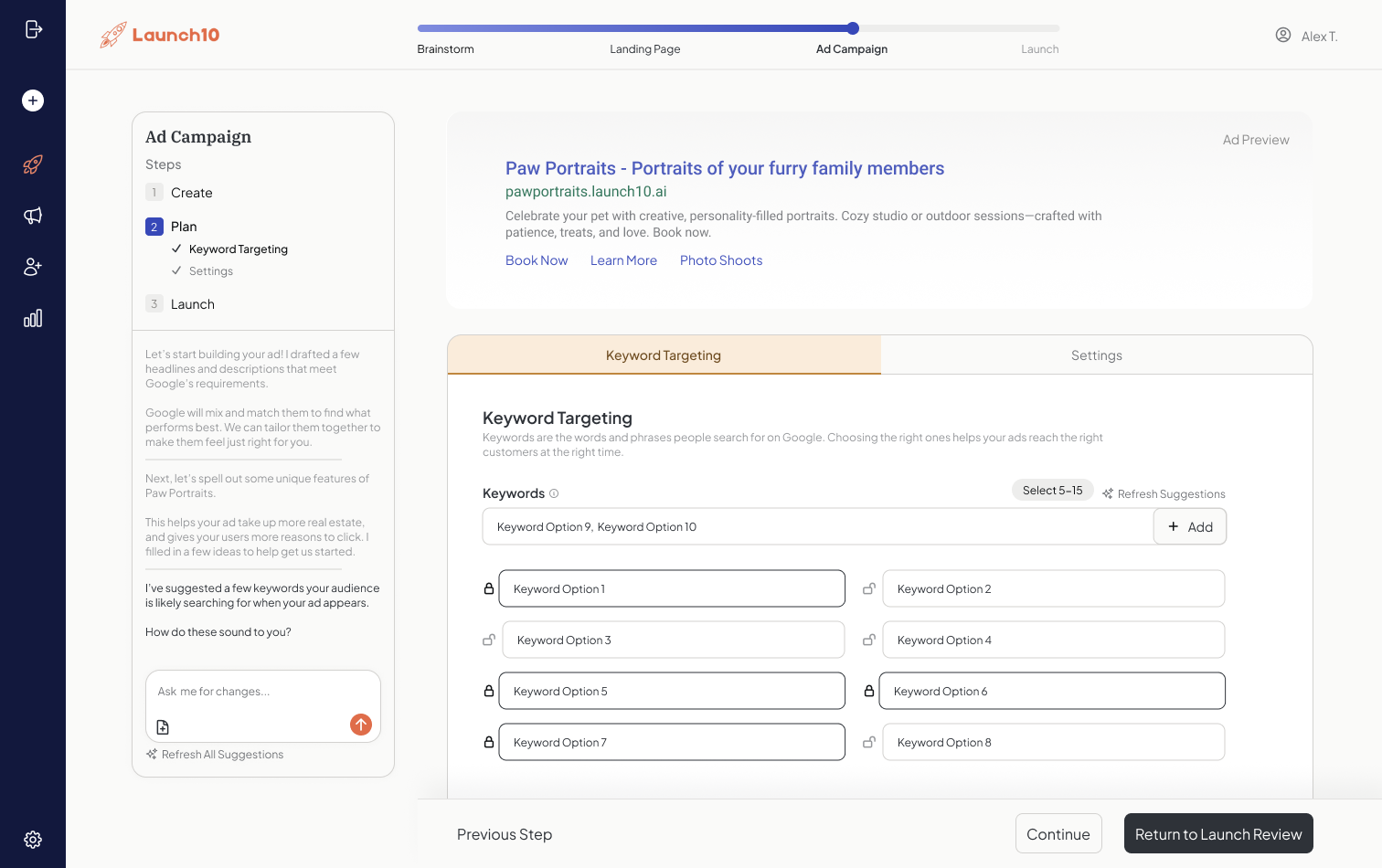
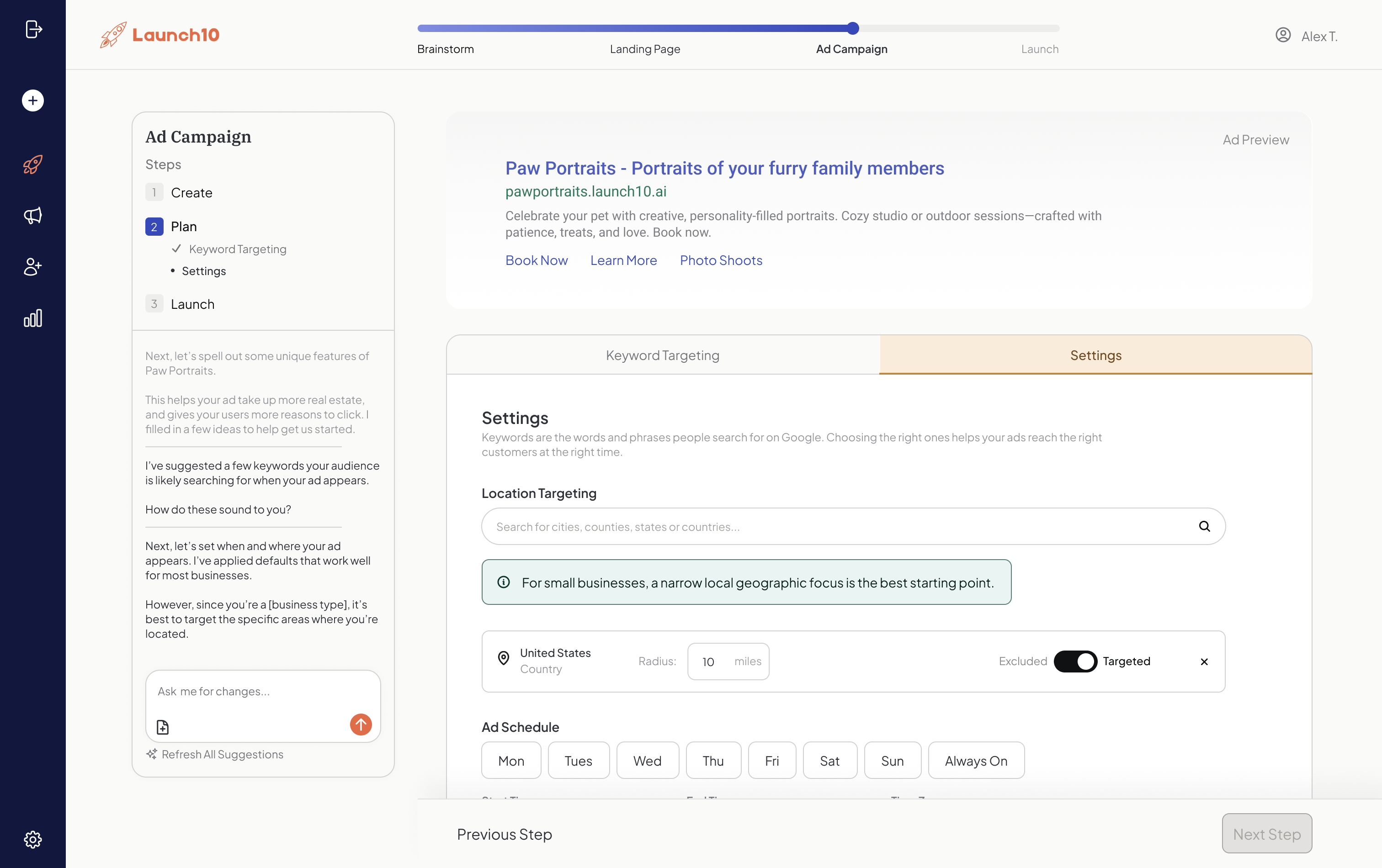
Downside: Less granular control than full DIY, platform subscription cost on top of ad spend. Platforms like Launch10 handle landing page creation, keyword selection, ad copy, and conversion tracking as a connected system — useful if you want to skip the 20-hour learning curve and get to a well-structured campaign quickly. Your pages are also optimized to get cited by Gemini, ChatGPT, Claude, and Perplexity — so customers find you whether they search Google or ask AI. See our pricing page for details.
Cost: Typically $50-$300/month for the platform, plus ad spend.
Agency
Best for: Businesses spending $5,000+/month on ads who want expert, hands-on management.
Time investment: A few hours per month for check-ins and approvals.
Upside: Expert management, advanced strategies, someone else handles everything.
Downside: Expensive ($1,000-$5,000+/month in management fees on top of ad spend), quality varies wildly, some agencies lock you into their accounts so you lose everything if you leave. Always insist on owning your own Google Ads account.
The Landing Page Connection
Dedicated landing pages convert 2-5x better than homepages because they match the searcher’s intent and eliminate distracting navigation.
One thing this entire guide circles back to: your landing page is not separate from your Google Ads campaign. It is part of it. Google literally grades your landing page as part of your Quality Score, which determines what you pay per click. A great ad with a bad landing page is like a great salesperson handing customers off to an empty store.
The data is clear. Dedicated landing pages outperform homepages by a wide margin — conversions improve substantially when traffic goes to a purpose-built page. Message match between ad copy and landing page copy can double conversion rates. And proper conversion tracking, which requires your landing page and ads to be technically connected, is the only way to measure whether any of this is working.
If you take one thing from this guide, let it be this: your ads, your landing page, and your tracking need to work as a single system. Whether you build that system yourself with separate tools, use a platform that connects them automatically, or hire an agency to manage it — the connection is what makes the money. Read our full breakdown in Why Your Landing Page and Ads Should Be Connected.
Getting Started: Your First 30 Days
Spend week one on tracking and structure, week two on keywords and ads, week three on your landing page, and week four on optimization.
Here is a practical roadmap for your first month with Google Ads, whether you do it yourself or use a tool to speed things up.
Week 1: Foundation. Set up your Google Ads account. Install conversion tracking on your landing page. Define 2-3 campaigns based on your core services. Select 10-20 exact and phrase match keywords per ad group. Write 3-4 ad variations per ad group. Set a daily budget of $20-$50 to start.
Week 2: Launch and monitor. Turn on your campaigns. Check daily for the first week — look at which searches trigger your ads (the search terms report) and add negatives for irrelevant queries. Do not make major changes yet; you are collecting data.
Week 3: First optimizations. Pause keywords with clicks but zero conversions. Increase bids on keywords that convert. Test new ad copy variations. Check your Quality Scores and improve any below 5.
Week 4: Assess and scale. Calculate your cost per lead and cost per acquisition. If the numbers work, increase budget on winning campaigns. If they do not, revisit your keywords, your landing page, or your ad copy. Most campaigns need 30-60 days to hit their stride.
Google Ads is not magic. It is a system. The businesses that succeed with it are the ones that set it up correctly, track their results, and make data-driven adjustments every week. Start with a modest budget, measure everything, and scale what works. That approach beats guessing every time.
Related reading
- Why your Google Ads aren’t generating leads — diagnostic checklist for underperforming campaigns
- Connecting your landing page and ads — message-match foundational concept
- Google Ads conversion tracking setup — how to wire up the tracking that turns clicks into customer attribution
- Google Ads for dentists — vertical playbook for dental practices
- Google Ads for lawyers — vertical playbook for law firms
- Google Ads for contractors — vertical playbook for general contractors
- Dental marketing — vertical playbook for dental practices
- Marketing for solopreneurs — the broader channel mix for one-person businesses beyond Google Ads
Frequently asked questions
How much should a small business spend on Google Ads?
Is Google Ads worth it for small businesses in 2026?
What is a good conversion rate for Google Ads?
What is the biggest mistake small businesses make with Google Ads?
Should I hire an agency or manage Google Ads myself?
What is Quality Score and why does it matter?

Co-Founder & CEO, Launch10
Greg Hockenbrocht is the Co-Founder and CEO of Launch10. Before Launch10, he was on the executive leadership team at Fundera through its acquisition by NerdWallet, where he led Growth & New Ventures following the company's IPO. Through Illuminated Ventures and work with founders and business owners, he saw a need for Launch10 to help bring clarity, confidence, and ease to digital marketing.