Why Your AI-Generated Google Ads Campaign Is Underperforming

You Did the Smart Thing — And It Still Isn’t Working
Your AI-generated Google Ads campaign is underperforming because ad copy is only about 20% of what makes campaigns work. The other 80% — landing pages, conversion tracking, and attribution — requires infrastructure that no chatbot can build.
Here is a scenario playing out in thousands of small businesses right now. You heard Google Ads could bring in new customers. Instead of hiring an expensive agency, you opened ChatGPT and asked it to create a campaign. It gave you a well-organized set of ad groups, keyword suggestions, compelling headlines, and polished descriptions. You copied everything into Google Ads, set a $500 budget, and launched. The keyword suggestions looked reasonable — but ChatGPT has no access to actual search volume, cost per click, or competition data. It suggested keywords based on what sounded right, not based on what people actually search for or what it costs to compete.
A month later, you have spent $800. Your dashboard shows 312 clicks. But when you look at your actual business — your inbox, your phone, your appointment calendar — the number of new customers from those clicks is somewhere between “unclear” and “zero.” You have no idea whether the campaign worked, partially worked, or burned the entire budget on tire-kickers.
This is not a failure of AI. ChatGPT did exactly what you asked it to do. The problem is that what you asked it to do — write ad copy — is about 20% of what makes a Google Ads campaign actually work.
The Copy Is Probably Fine
Let’s get this out of the way: the ad copy ChatGPT wrote is almost certainly decent. Large language models are good at writing persuasive, keyword-rich headlines and descriptions. If you asked for responsive search ads targeting “emergency plumber Austin,” you probably got headlines like “24/7 Emergency Plumber in Austin,” “Licensed & Insured — Call Now,” and “Same-Day Service, No Hidden Fees.” That is solid ad copy. It matches the search intent, it includes a call to action, and it differentiates your business.
The copy is not your problem. What is killing your campaign is the infrastructure around the copy — the three things that ChatGPT cannot build, install, or connect for you.
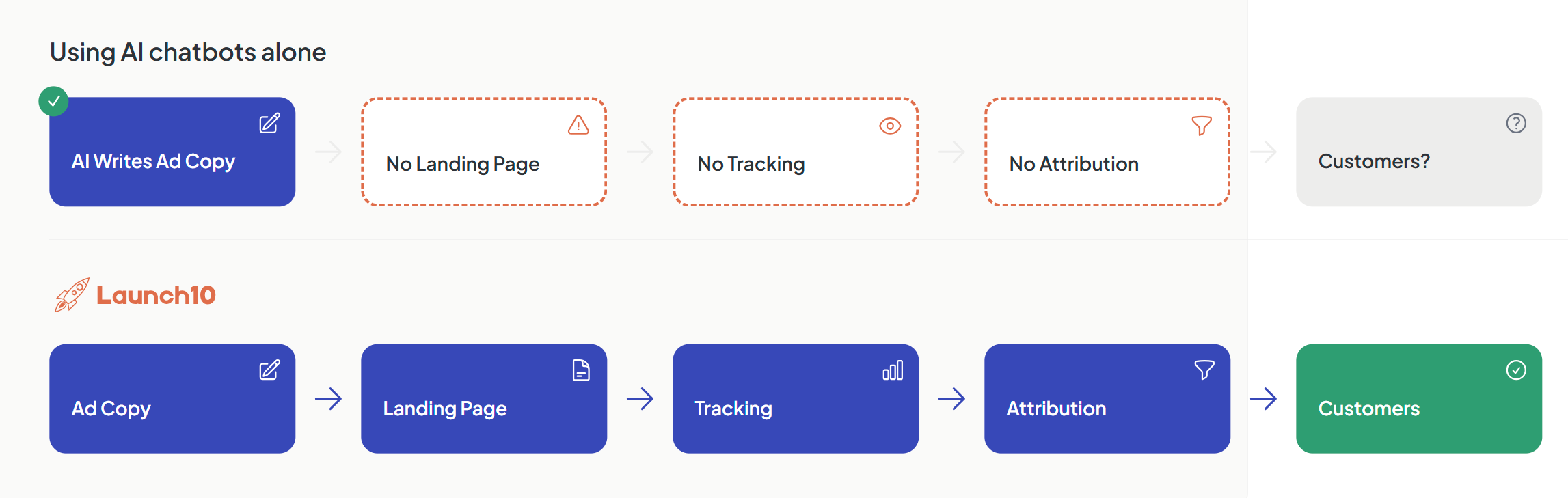
Gap 1: No Landing Page (or a Bad One)
Sending Google Ads traffic to your homepage instead of a dedicated landing page sharply cuts your conversion rate.
When you set up your Google Ads campaign, Google asked for a “final URL” — the page people land on after clicking your ad. If you are like most small businesses, you entered your homepage. It seemed logical. Your homepage explains your business, shows your services, and has your phone number.
But your homepage was built for browsing. It has a navigation bar with six links, a section about your company history, testimonials from three different service lines, a blog feed, and a footer with your address. Someone who just searched “emergency plumber Austin” and clicked an ad promising same-day service now has to figure out which of these elements is relevant to them. Most will not bother. They will bounce — and you just paid $4-8 for that click.
A dedicated landing page reliably outperforms a homepage. The reason is focus. A landing page has one message, one offer, and one call to action. There is no navigation bar to wander off through. There is no “About Us” section distracting from the conversion. The headline matches the ad they clicked. The form is above the fold. Everything on the page pushes toward a single action: contact you.
ChatGPT can write landing page copy if you ask — and it will write good copy. But it cannot build the page, host it, make it mobile-responsive, connect it to your ad campaign, or set a load speed under two seconds. You still need a landing page builder, hosting, a domain or subdomain, and the technical know-how to wire it all together. For most people, this is where the project stalls. The ad campaign runs, but it sends every click to a homepage that was never designed to convert paid traffic.
For more on why this connection matters, see our guide on why your landing page and ads should be connected.
Gap 2: No Conversion Tracking
This is the gap that does the most damage, and it is the hardest to explain because it is invisible. When conversion tracking is missing, your campaign looks like it might be working — you see clicks, you see impressions, you see a click-through rate. Everything in the Google Ads dashboard has a number next to it. But the one number that actually matters — how many of those clicks became customers — is blank.
The data on this is stark. According to WordStream’s analysis of over 15,000 Google Ads accounts, 29% recorded zero conversions over a 90-day period — a strong indicator that conversion tracking is either missing or broken. That means a significant share of businesses running Google Ads are spending money with no way to measure whether it is working.
Here is why this matters beyond just reporting. Google Ads has powerful smart bidding algorithms — Target CPA, Maximize Conversions, Target ROAS — that automatically adjust your bids to find the people most likely to become customers. But these algorithms need conversion data to learn. Without it, they are flying blind. Your campaign falls back to “Maximize Clicks,” which does exactly what it says: it finds the cheapest clicks available. Cheap clicks and valuable clicks are rarely the same thing.
ChatGPT understands this problem and can explain it clearly. Ask “how do I set up conversion tracking for Google Ads?” and you will get a thorough, accurate answer. It will walk you through creating a Google Tag Manager account, installing the container snippet on your website, creating a conversion action in Google Ads, building a tag in GTM that fires on form submission, configuring triggers, and connecting everything back to your Google Ads account.
That explanation is correct. It is also a multi-hour technical project that requires you to:
- Create a Google Tag Manager account and container
- Add the GTM container code to every page of your site (in the
<head>and after the opening<body>tag) - Create a conversion action in Google Ads and copy the conversion ID and label
- Build a Google Ads Conversion Tracking tag in GTM using that ID and label
- Configure a trigger that fires when someone submits your contact form (which requires identifying the form’s submission event — different for every website builder)
- Publish the GTM container
- Test everything using Google’s Tag Assistant to verify the tag fires correctly
- Wait 24-48 hours and check that conversions appear in your Google Ads dashboard
- Debug when they do not, which happens more often than not on the first attempt
Most business owners get through step 2 or 3 before giving up. The gap between “understanding how conversion tracking works” and “having conversion tracking actually working” is enormous. It is the difference between reading a wiring diagram and rewiring a house.
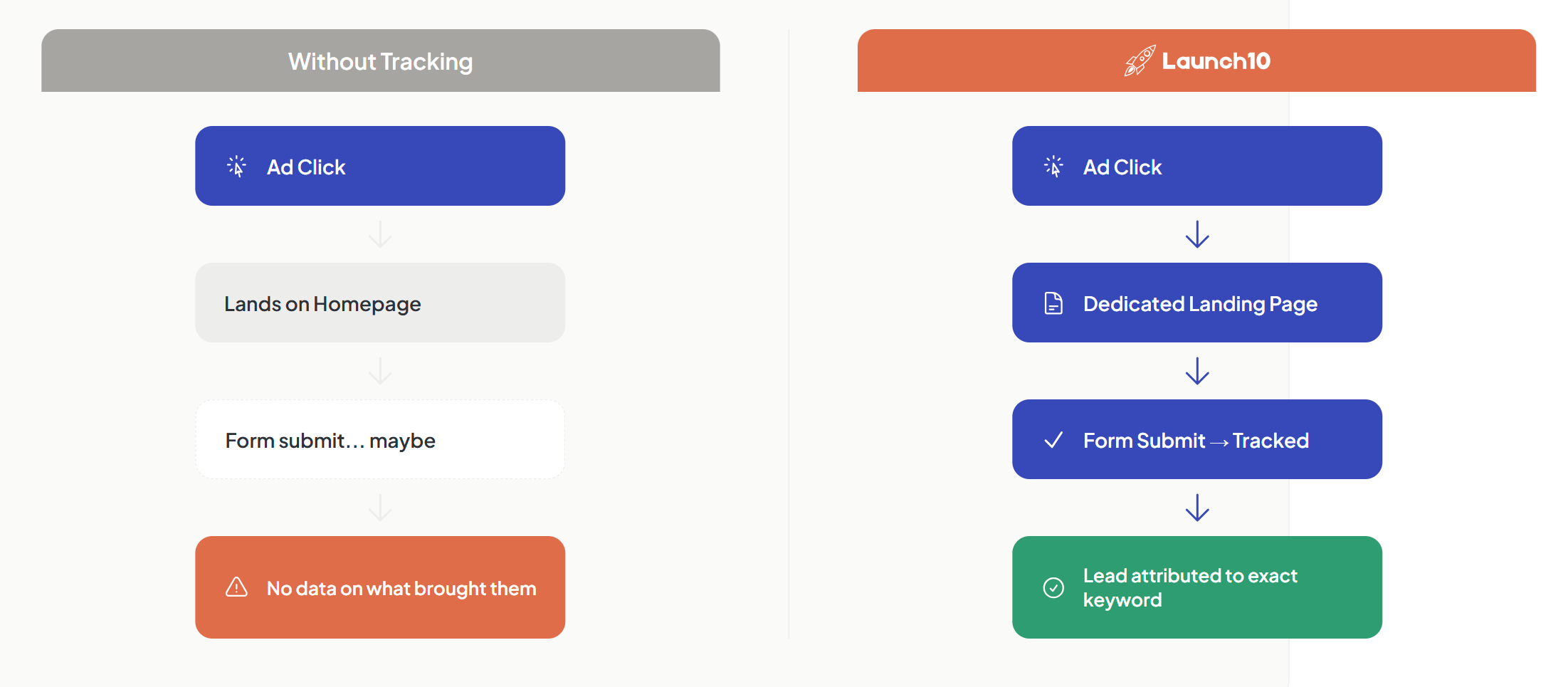
The result is that your Google Ads campaign runs for weeks or months optimizing for clicks instead of conversions. You pay for traffic, not for customers. And because you have no conversion data, you cannot tell which keywords are generating leads and which are wasting money — so you cannot fix it even if you wanted to.
Gap 3: No Attribution Loop
Without attribution, you know how much you spent on Google Ads but not which keywords, ads, or campaigns produced actual customers. Even if you have a landing page and conversion tracking, there is still a critical gap: you cannot see which keyword generated which lead.
Google Ads shows you aggregate data. You know that your campaign generated 20 conversions last month. But which of your 15 keywords drove those conversions? Was it “emergency plumber Austin” at $6 per click, or “cheap plumber near me” at $2 per click? If seven of the 20 conversions came from one keyword and zero came from five others, you should triple the budget on the winner and pause the losers. That single reallocation could cut your cost per customer in half.
This is the attribution loop: keyword leads to ad, ad leads to click, click leads to landing page visit, visit leads to form submission, submission leads to customer. When you can see this full chain, optimization is straightforward. When you cannot, optimization is guesswork. You either leave everything running equally (wasting money on underperformers) or you make gut-feel changes that are just as likely to cut your best keyword as your worst.
Building a complete attribution loop requires your landing page, your ad platform, and your analytics to share data bidirectionally. Your landing page needs to capture the Google Click ID (GCLID) when a visitor arrives and pass it through with the form submission. Your CRM or lead management system needs to store that GCLID alongside the lead’s contact information. And when that lead becomes a customer, that outcome needs to flow back to Google Ads so the algorithm learns which clicks are actually valuable.
This is not something ChatGPT can set up. It is not even something most agencies set up correctly. It requires integration between systems, and integration is exactly what breaks down when you are stitching together four or five separate tools.
The Fix: Close All Three Gaps
When your landing page, ads, and tracking work as a single connected system, the difference is immediate and measurable. Instead of wondering whether your campaign is working, you know — typically within the first week — which keywords bring customers and which ones waste money. Instead of optimizing for clicks, Google’s algorithms optimize for actual conversions because they have the data they need. Instead of guessing where to shift budget, you can see the full path from search term to paying customer.
This is what a closed-loop advertising system looks like: a dedicated landing page that matches your ad copy, conversion tracking that fires automatically when a lead comes in, and attribution that traces every customer back to the keyword that found them. When all three work together, small businesses regularly see their cost per lead drop meaningfully within the first month — not because the ads changed, but because the system around the ads finally works.
Launch10 is a purpose-built AI platform that builds all three of these as a single system — its AI generates your landing page, creates your ad campaign, and configures tracking automatically, all connected from the start. It uses the same kind of AI as ChatGPT for generating copy, but applies AI across the full campaign so you don’t have to stitch together separate tools. One booked customer typically covers months of Launch10 at $59/month — whether that’s a $5,000 legal case from Google Ads for lawyers, a $450 HVAC repair from a paid search campaign, or a $200 dental cleaning. But regardless of what tool you use, the principle is the same: the ads are not the hard part. The infrastructure is.
What to Do Right Now
If your Google Ads campaign is not converting, resist the urge to rewrite the ad copy. The copy is almost certainly not the problem. Instead, check these three things in order:
-
Where do your ads send traffic? If it is your homepage, that is your first fix. Build or commission a dedicated landing page with a single call to action that matches your ad’s promise.
-
Is conversion tracking working? Go to Google Ads, then Tools, then Conversions. If you see no active conversion actions with recent data, tracking is broken or missing. This is your most impactful fix.
-
Can you trace a lead back to a keyword? If you cannot tell which search terms generate your best customers, you cannot optimize. You are flying blind with budget allocation.
Fix those three gaps and your “underperforming AI campaign” will almost certainly start performing. The ad copy ChatGPT wrote was fine. It just needed a system around it that could turn clicks into customers — and then prove that it did.
Related reading
- Why your Google Ads aren’t generating leads — broader diagnostic checklist
- Connecting your landing page and ads — foundational message-match concept
- AI for Google Ads — broader AI-marketing context
Frequently asked questions
Why are my Google Ads getting clicks but no conversions?
How do I know if my Google Ads conversion tracking is set up correctly?
Should I use ChatGPT to manage my Google Ads?
What's the first thing to fix if Google Ads aren't working?

Co-Founder & CEO, Launch10
Greg Hockenbrocht is the Co-Founder and CEO of Launch10. Before Launch10, he was on the executive leadership team at Fundera through its acquisition by NerdWallet, where he led Growth & New Ventures following the company's IPO. Through Illuminated Ventures and work with founders and business owners, he saw a need for Launch10 to help bring clarity, confidence, and ease to digital marketing.