
Bolt.new Alternatives: 7 AI App Builders Compared (2026)

Bolt.new is one of the most talked-about AI app builders of 2026, and it earned the attention — for coders. For coders prototyping SaaS products, it’s a strong tool.
But lots of people aren’t building an app - they’re building a business. What they want is killer marketing pages, effective ads, and a way to track their results.
For this audience, there’s another category of tools entirely - the automated marketing funnel. This is the tool for the business owners, marketing agencies, plumbers, and dentists who want to promote their businesses and run effective ads. These are the people who need a system that handles everything from keyword research to ad creation to conversion tracking.
This is an honest comparison of seven alternatives - including both app builders and automated marketing tools.
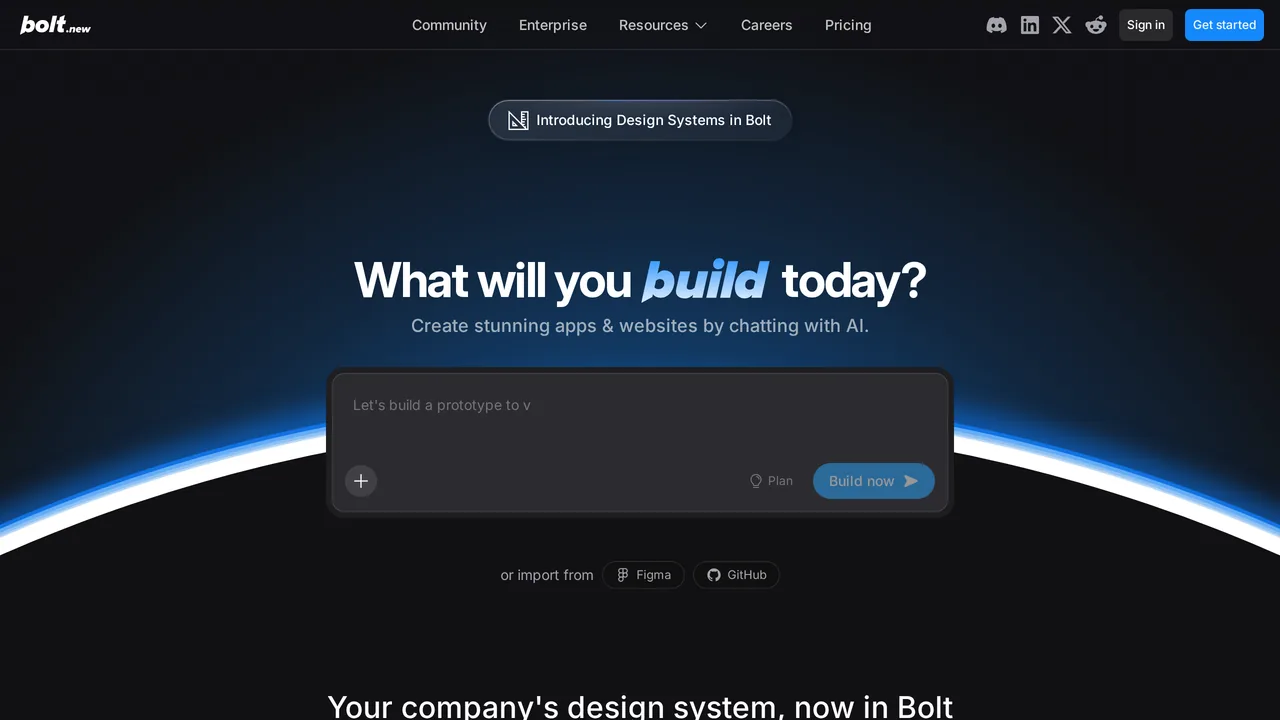
Who Should (and Shouldn’t) Leave Bolt.new
Stay on Bolt.new if you’re a developer shipping a prototype, an MVP, or a side project. You want to see code, you want a runtime, you want framework flexibility. Bolt is genuinely good at this.
Leave Bolt.new if you didn’t come here to write software. If you’re a business owner, a marketer, a founder, an agency operator — anyone whose actual job is “more customers, more leads, more revenue” — you’re in the wrong category of tool. App builders compete on developer ergonomics. You don’t need developer ergonomics. You need ad clicks that turn into paying customers, and that requires a different product entirely.
Quick Comparison
| Tool | Starts at | Best for | What it solves |
|---|---|---|---|
| Lovable | $25/mo | Technical founders, MVPs | Cleaner React code + GitHub sync |
| v0 (Vercel) | $20/mo | React/Next.js devs on Vercel | Best-in-class UI component generation |
| Replit | $20/mo | Beginners, educators | Cloud IDE + agent + real runtime |
| Cursor | $20/mo | Professional developers | Multi-file agent edits in real codebases |
| UI Bakery | $20/user/mo | Internal tool builders | Low-code over real databases |
| Superblocks | $100/mo | Mid-market enterprise IT | Governed internal tools with SSO/RBAC |
| Launch10 | $59/mo | Anyone running paid search or social ads | Keyword research + page + ads + tracking + lead delivery |
1. Lovable
Tagline: “Build something Lovable.” Starts at: $25/month on the Pro plan (100 monthly credits + 5 daily). Free tier available.
Lovable is the most common head-to-head in “Bolt vs X” reviews, and the comparison has stabilized: Lovable tends to produce cleaner frontend code, has bi-directional GitHub sync that makes it trivial to move work to Cursor and back, and ships with SOC 2 Type 2 and ISO 27001 out of the box. Bolt tends to win on framework flexibility and browser-based full-stack speed. Lovable crossed $400M ARR in February 2026 and raised a $330M Series B at a $6.6B valuation in December 2025, with enterprise customers including Klarna, Uber, and Zendesk.
One real caveat specific to April 2026: a security researcher disclosed a Broken Object Level Authorization flaw on April 20 that exposed source code and database credentials on public projects for seventy-six days. Lovable has since converted historical public projects to private and shipped a fix. Worth knowing before you migrate sensitive workloads.
Best for: Non-technical founders prototyping MVPs who want cleaner code output and fewer credit-anxiety moments. Key limit: Backend logic still breaks on complex flows; credit ceiling on Pro hits during heavy iteration months.
2. v0 (by Vercel)
Tagline: “Prompt. Build. Publish.” Starts at: Free tier ($5 credits); $20/month Premium (legacy — closed to new signups); Team $30/user/month; Business $100/user/month.
v0 rebranded from v0.dev to v0.app in August 2025 and shifted from a React-component generator to an agentic full-stack app builder. The Vercel ecosystem integration is tight — GitHub imports, Git-panel-driven PR workflows, one-click Vercel deploys. That’s the strength and the lock-in: v0’s native output is Next.js + Tailwind + shadcn/ui, and moving off that stack means manual rewrite. The May 2025 pricing change from flat $20 Premium to token-based credit billing remains the biggest switching driver in the v0 community.
A note for April 2026: Vercel disclosed a security incident on April 19 after a compromise at Context.ai exposed environment variables for a subset of customer projects. Worth factoring into any enterprise-readiness conversation.
Best for: React and Next.js developers who already deploy on Vercel and want the highest-quality UI component output in the category. Key limit: Token-based pricing punishes iteration; heavy Vercel/Next.js lock-in; backend/full-stack capability is newer than the UI-generation strength.
3. Replit
Tagline: “From idea to deployed app.” Starts at: $20/month on Core (annual billing, $25 Agent credits, 5 collaborators).
Replit is the only option on this list that ships a full cloud IDE beneath the AI agent. You can drop into the code at any time, run arbitrary backends (Python, Go, Node), and deploy from the same browser tab. That’s what makes Replit the default for students, educators, and bootcamp graduates. The Replit Agent is also excellent at zero-to-deployed for CRUD apps and simple SaaS prototypes. The limits are predictable: the Agent is probabilistic on long autonomous builds, free-tier projects cold-start in ten to fifteen seconds, and the platform is not suitable for SOC 2 or HIPAA workloads without the Enterprise tier.
Best for: Complete beginners and educators who want cloud-hosted development plus AI assistance in one environment. Also strong for multi-language prototypes where you need real runtime, not a static deploy. Key limit: Agent quality degrades on long autonomous sessions; hosting on Replit makes migration out nontrivial.
4. Cursor
Tagline: “The best way to code with AI.” Starts at: Free Hobby tier; $20/month Pro; Pro+ $60; Ultra $200; Teams $40/user.
Cursor is where serious developers go when they outgrow prompt-to-app tools. It’s a VS Code fork with AI editing as a first-class feature — multi-file agent edits, repo-wide context, inline autocomplete that actually understands your codebase. For projects above fifteen or twenty components where Bolt’s context window starts failing, Cursor is the standard escape hatch. Cursor hit $2B in annualized revenue by February 2026, and the JetBrains 2026 developer survey reports that eighteen percent of developers use it at work, making it one of the most-adopted AI coding tools in the industry. The catch: Cursor assumes you can already code. It’s not a prompt-to-app tool for non-developers.
Best for: Working software engineers who want AI pair programming inside a real IDE, operating on real production codebases. Key limit: No UI for non-technical users; requires an existing project; credit-based billing after the June 2025 pricing change can be unpredictable.
5. UI Bakery
Tagline: “Build internal tools that are baked to scale.” Starts at: Free tier; $20/user/month on the Cloud Builder plan.
UI Bakery is a low-code internal-tool builder with AI generation layered on top. Unlike Bolt, which is optimized for consumer-facing apps and marketing sites, UI Bakery is built to sit on top of your existing databases and generate admin panels, dashboards, and customer portals. Fifty-plus data connectors are available out of the box, and every paid tier includes self-hosting, which matters for teams with compliance or data-residency requirements. If the project you’re building is a CRUD tool over SQL or a warehouse, UI Bakery will save you weeks. If it’s a public website or a landing page, this is the wrong category.
Best for: Small-to-mid technical teams building internal tools on top of existing databases, especially with self-hosting or SQL-connectivity needs. Key limit: Not designed for consumer-facing websites or marketing campaigns; steeper learning curve than Bolt or Lovable.
6. Superblocks
Tagline: “Build tools 10x faster for a fraction of the cost.” Starts at: $100/AI Builder/month on the Teams plan (billed annually; $125 billed monthly); Enterprise custom. No free tier — 14-day trial only.
Superblocks is UI Bakery’s enterprise cousin. It’s built for IT buyers at mid-market and enterprise companies who need governed internal tools with SSO, RBAC, Git-based workflows, and Cloud-Prem deployment that keeps AI inference inside the customer’s cloud perimeter. Most Bolt users won’t need Superblocks. But if you work at a company where “can we put this on SSO and audit-log every action” is the first procurement question, Superblocks answers it where Bolt doesn’t.
Best for: Mid-market and enterprise IT teams building internal applications on production data with governance requirements. Key limit: Overkill and overpriced for solo founders or small teams; consumer-facing apps and marketing sites are not the target.
7. Launch10 — Built for the Person the Other Six Weren’t
Tagline: “The marketing tool that gets better every time you run it.” Starts at: $59/month.
We built Launch10 for the person every other tool on this list quietly forgets: the business owner, the marketer, the agency, the non-technical founder. The person whose job is to bring in customers — not to ship software.
Every other tool on this page is built for developers. They argue about TypeScript versus Python. They want to see the code. They ask for GitHub sync. People asked us for GitHub sync constantly. We said no, and we’ll keep saying no — that’s not who this is for. If you wanted to read code, you’d already be reading code. You’re here because you want more customers, and the AI tools you’ve tried so far keep handing you software when what you needed was marketing.
So we built the opposite. We don’t show you the codebase. We don’t ask which framework you prefer. We quietly handle the technical parts — the page, the speed score, the ad extensions, the tracking, the webhook to your CRM — and put the parts that actually matter to your business in front of you: ad spend, cost per lead, return on ad spend, customers driven.
Here’s what that looks like in practice:
- Keyword research with real cost data. We hunt the high-intent phrases your customers type — and your competitors aren’t bidding on. You don’t read a SERP report. You see a recommendation: “go after these three phrases this week.”
- Pages built to Google’s speed rules. Sub-second loads. “Good” Core Web Vitals on phones, laptops, and tablets. You don’t tune it. We do. The result is a higher Quality Score, which means lower cost per click — same budget, more leads.
- Ads written the way Google rewards them. Fifteen headlines, four descriptions, sitelinks, callouts, structured snippets — the things you’ve never heard of that quietly cut your cost per click 30–40%. You approve the copy. We handle the structure.
- Tracking from click to customer. Every Google Ads click is tagged and tied to the form fill, the lead, and the dollar amount when they pay you. No tag manager. No analytics consultant. Just an honest answer to “which ad brought us this customer.”
- Recommendations, not dashboards. “Cut this keyword — it spent $80 last week and brought zero leads. Test this new headline. Add these three zip codes to your targeting.” A short list of decisions in plain English. Not a graph you have to interpret on a Sunday night.
- Pages drawn by real designers. Every template is hand-crafted by our design team before any AI touches it. Your business gets fitted into it — colors, copy, photos, offer. No gradient soup, no emoji parade, no AI-generated stock visuals. It looks like a studio made it, because one did.
- Leads delivered wherever you already work. HubSpot, Mailchimp, Salesforce, Slack, Google Sheets, your own webhook — pick where you want leads, and they show up there in seconds. 5,000+ tools via Zapier.
This is not a better Bolt. If you’re a developer, the six tools above are the right answer. Launch10 is a different product entirely — an AI builder that also gets you customers, an end-to-end marketing tool built specifically for the business owners, marketers, and agencies who measure success in customers, not commits.
Best for: Business owners, marketers, agencies, and non-technical founders who want more leads — not a codebase. Especially strong for local service businesses (HVAC, plumbing, dental, legal, chiropractic, roofing) and the agencies serving them. Connects to HubSpot, Salesforce, Mailchimp, Monday, Slack, and 5,000+ other tools via Zapier. Key limit: No code editor. No GitHub sync. No Node runtime. We don’t show you the engine. We show you the customers.
How to Choose
- You’re shipping an MVP this weekend: Bolt or Lovable. Lovable if you want cleaner code; Bolt if you want faster full-stack scaffolding.
- You’re a React/Next.js developer on Vercel: v0.
- You’re a beginner or educator: Replit.
- You’re a professional developer in a real codebase: Cursor.
- You’re building an internal tool on existing data: UI Bakery (smaller) or Superblocks (enterprise).
- You want customers from paid search or social, not an app: Launch10.
The last bullet is the one most “Bolt alternatives” lists miss. If the AI app builder you chose did the job correctly and you still don’t have customers, the app builder was never the bottleneck — the marketing funnel around the page was.
Related reading
- Lovable alternatives — adjacent AI-builder roundup with similar audience
- v0 alternatives — developer-focused AI builders compared
- AI landing page builders for Google Ads — foundational landscape view
Frequently asked questions
Why do people leave Bolt.new?
Is Lovable better than Bolt.new?
What's the open-source alternative to Bolt.new?
Can Bolt.new build landing pages for Google Ads?
Is Bolt.new good for production apps?

Co-Founder & CEO, Launch10
Greg Hockenbrocht is the Co-Founder and CEO of Launch10. Before Launch10, he was on the executive leadership team at Fundera through its acquisition by NerdWallet, where he led Growth & New Ventures following the company's IPO. Through Illuminated Ventures and work with founders and business owners, he saw a need for Launch10 to help bring clarity, confidence, and ease to digital marketing.